Updating PrestaShop 8 to 9: Case Study on Upgrade & Migration

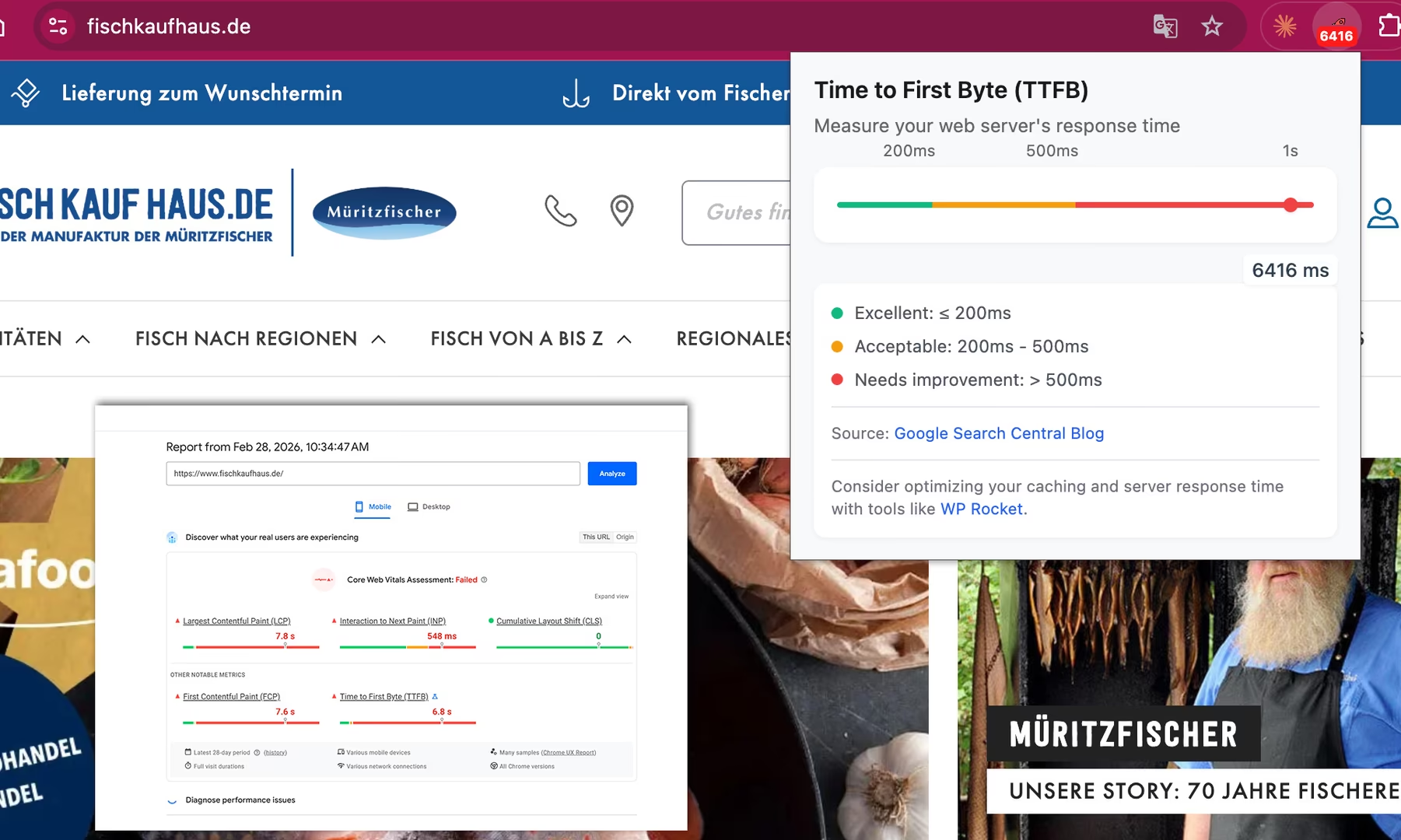
The upgrade from PrestaShop 8 to 9 not only brought a modern system, but also massively improved server response time: the Time to First Byte dropped from over 6,000 ms to around 200–250 ms. In this case study we share our experience from a real PrestaShop migration: upgrading a high-traffic shop from PrestaShop 8 to 9. Even though PrestaShop offers an update tool, a major upgrade in practice is often more of a small migration than a “click update”. That’s exactly why we document our experience here and provide a concrete guide on how to cleanly prepare and stably launch a PrestaShop upgrade from 8 to 9 — avoiding typical sources of error.
Why a PrestaShop upgrade from 8 to 9 is more of a migration
Many shops are still running on older PrestaShop versions. This is risky in the long term. The main reasons for an upgrade are:
- security updates
- better PHP compatibility
- Performance improvements
- long-term maintainability of the shop system
- better module compatibility
For heavily trafficked shops especially, it’s important to keep the platform technically current without jeopardizing ongoing operations.
Fischkaufhaus.de is an established online shop with thousands of daily visitors, which we have been managing for ten years now. The shop has already been recognized with multiple awards and was most recently named best online fish retailer in 2026.

An update therefore could not cause any downtime during peak traffic hours.
Updating a high-traffic shop: planning is everything
The update was deliberately scheduled for a low-traffic time: 3:00 AM. The real key to success, however, lay in the preparation. Before the update was started on the live server, the entire process was simulated multiple times:
- locally in a Docker environment
- on a separate development server
In total, three full days were allocated exclusively for testing and troubleshooting during preparation.
In doing so, we were already able to:
- identify module conflicts
- optimize server configurations
- document update issues
- prepare concrete fixes
By the time the actual update process started on the live system, most problems were already known, documented, and resolved.

Technical process of updating from PrestaShop 8 to 9
A PrestaShop upgrade from version 8 to 9 is technically often more of a migration than a simple update. The system environment changes significantly, and many modules and custom configurations must be adapted.
- Step 1: Backup & environment check
- Complete database and file backup
- Server requirements check (PHP version, MySQL, Apache)
- Module compatibility check
Step 2: Test migration in staging
Running the update assistant
Through the previously documented tests, this problem could be resolved quickly.
Challenges during the live update
Despite the intensive preparation, additional problems arose during the live update. The reason: the production server did not exactly match the test environment. Server structure differences in particular led to additional adjustments. The following were analyzed for troubleshooting:
- Apache logs
- MySQL logs
- PHP error logs
Based on this data, targeted adjustments to the server configuration could be made.
Go-live: the shop was back online the same morning
After the update was completed, the following critical functions were manually tested:
- Shopping cart
- Login
- Checkout
- Shipping (shipping label creation)
- Payment
- SEO structures
After these tests were successful, the shop was released again.
The first order in the new system came in just a few minutes after go-live.
Stabilization after the update
A major update of a shop system doesn’t end with the go-live. In the following days, further optimizations were carried out:
Backend work:
- analyzing server errors
- fine-tuning configurations
- fixing module issues
Frontend work:
- correcting missing images
- adjusting module layouts
- fixing minor UI errors
In total, full stabilization took about five days, because some issues only became apparent in real use that weren’t captured by automated crawler tests and log data.
An important point from our experience: after a PrestaShop migration, tracking and consent should always be part of the checklist — not just a ‘nice-to-have’. Otherwise Google Ads, affiliate campaigns, and conversion tracking will run blind during or after the upgrade, burning ad spend.
Today the shop runs stably and smaller optimizations are handled on an ongoing basis.
Performance: why PrestaShop 9 is significantly faster
Another important effect of the update was the massive improvement in server response time. Before the upgrade, the Time to First Byte (TTFB) was sometimes over a staggering 6,000 milliseconds. The causes lay not only in the server environment, but also in the PrestaShop system itself. The older PrestaShop version, combined with the former server configuration, caused additional delays in the backend.
In the course of the update, several measures were implemented:
- Upgrade to PHP 8.4
- full update of all server packages
- optimization of Apache and PHP configuration
- adjustment of server parameters to the load of a high-traffic shop
20x faster: TTFB from 6,000 ms to 200 ms
The result was clearly measurable: TTFB after the update: 200–250 ms … comfortably in the green zone.
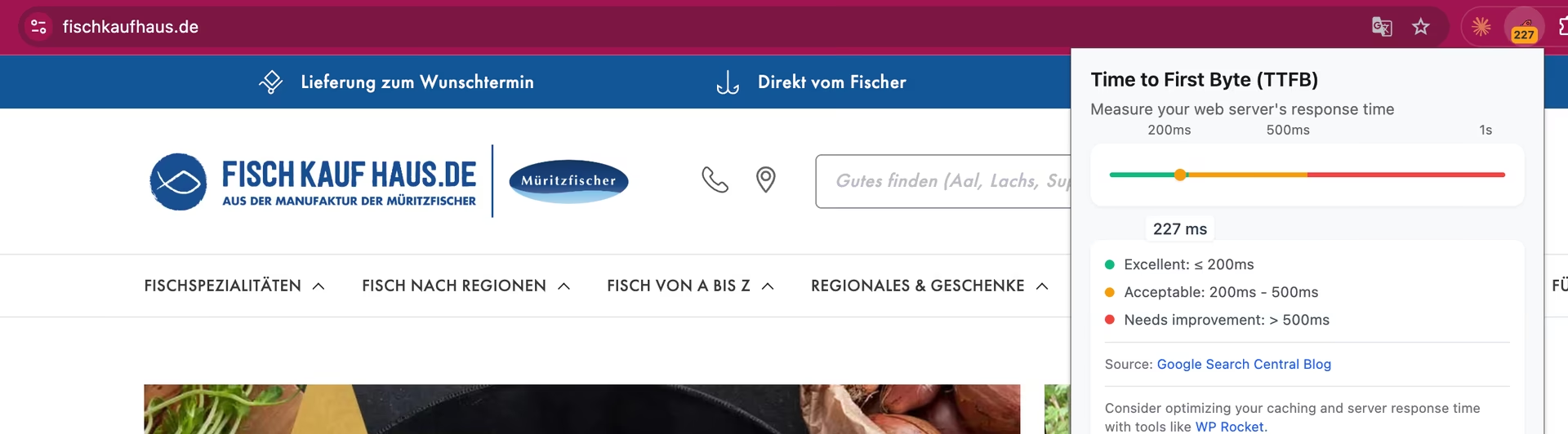
This means the shop backend now responds approximately 20 times faster than before the upgrade.
- This has a direct impact on:
- user experience
- SEO signals
- crawling efficiency of search engines
Backend operations for product management and order processing are also now significantly faster, thanks to the dramatically improved server response time.
Experiences from the project: PrestaShop update from 8 to 9 for Fischkaufhaus.de
Beyond the technical challenges, a shop update also involves organizational aspects that are often underestimated.
- Always perform the update outside of shipping hours: For shops with daily dispatch, it’s essential to ensure that packages can be prepared and shipped on the day in question. All involved parties in the company should therefore be informed about maintenance windows well in advance, so there are no disruptions to operations.
- Tracking systems can fail during and immediately after the update: During the update, some tracking systems temporarily did not work correctly. This included Google Tag Manager, consent management, and affiliate tracking. These must be actively checked and, if necessary, reconfigured after the upgrade.
- Module issues can occur even after successful testing: Even if a module appeared to work in staging, it may behave differently in production. This is especially true for modules that interact with server-specific configurations or third-party services.
- The update assistant is a helpful starting point, but not a guarantee: PrestaShop’s built-in update tool automates many steps, but cannot resolve all conflicts automatically. Manual intervention is often required.
- Plan for stabilization after the update: A major update doesn’t end with the go-live. In our case, we planned for — and needed — approximately five days for stabilization, fine-tuning, and bug fixing.
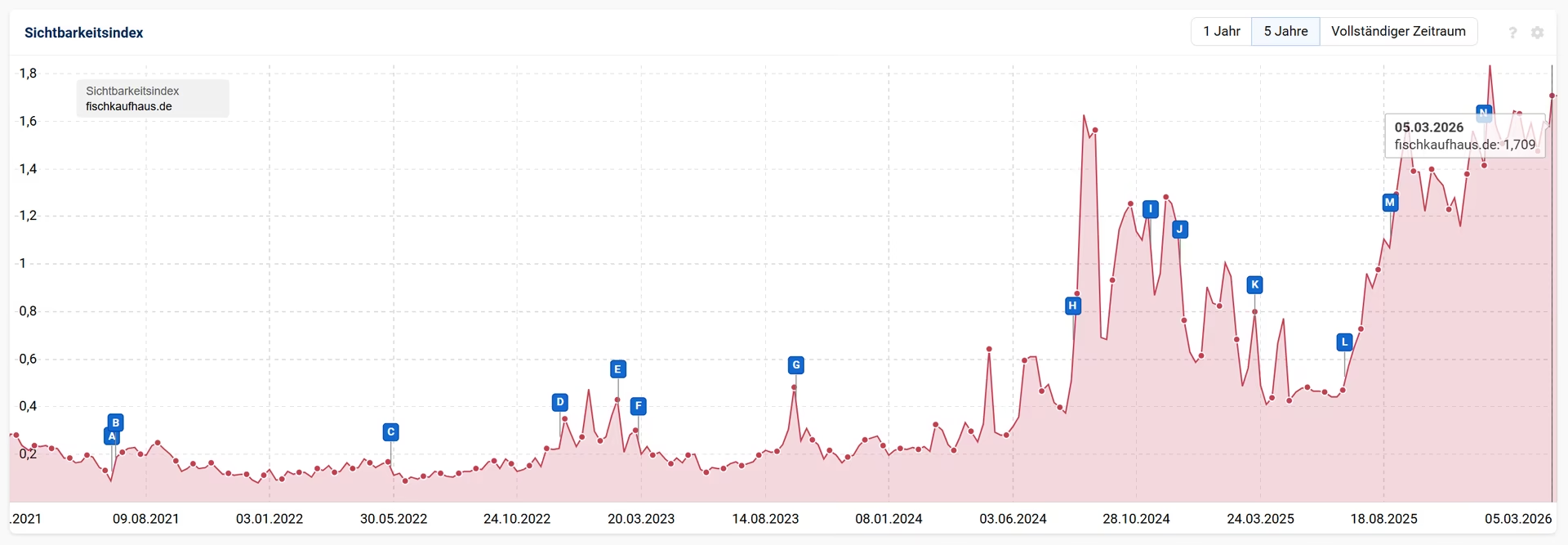
In recent years we have been able to steadily grow our rankings — even with AI answers appearing in Google. We’re now curious to see how the updated system and the noticeable PageSpeed improvement will pay off in terms of visibility going forward.
Conclusion: Is a PrestaShop upgrade from version 8 to 9 worth it?
An upgrade from PrestaShop 8 to 9 is particularly worthwhile for shops with many modules, high load, or older server configurations. In addition to security updates, the new version often brings noticeable performance improvements, better PHP compatibility, and long-term maintainability. The key, however, is thorough preparation: those who test the upgrade locally and in a development environment first can minimize risks and bring the live upgrade to a successful conclusion.
Frequently asked questions about upgrade & migration in PrestaShop
Theoretically the ‘Update Assistant’ helps, but in practice an upgrade from PrestaShop 8 to 9 for customized shops is often a small migration rather than a ‘click update’. Themes, overrides, modules, and the server environment must be checked beforehand, otherwise errors occur in live operation that interrupt it for longer than shop operators (and customers) would like.
With a clear plan: first test locally or in staging, then run through on development, document module conflicts and server requirements, and only then start the live upgrade. This makes the upgrade controllable and low-risk.
That depends heavily on custom developments and modules. In our case, the live upgrade was possible in a few hours because several days of preparation had been done in advance. Stabilization afterwards can still take a few days.
Most commonly: incompatible modules, differences between test and production environments, and server-side issues (PHP, Apache, MySQL). Even deactivated modules can still interfere and must be considered during the upgrade.
Very often: tracking and consent. Google Ads tracking, consent management, and affiliate tracking must be actively checked after the upgrade and sometimes reconfigured, otherwise conversion data is missing and campaigns run ‘blind’.
Best done during minimal traffic hours (e.g. at night) and coordinated with operational processes. For shops with shipping logic: consider shipping days and inform all stakeholders in advance so there are no disruptions to daily business.
PrestaShop upgrade or migration planned?
An update of a shop system is not a routine click, but a technical project where experience makes the difference.
We have been supporting PrestaShop shops since version 1.6 and have carried out numerous upgrades and migrations over the years — from 1.6 to 1.7, from 1.7 to 8, and now the current upgrade to PrestaShop 9. Here we report on the PrestaShop upgrade from 1.6 to 8 with a full version jump.
We know the typical challenges from real-world practice: modules, overrides, server configurations, performance issues, or tracking topics after go-live.
If you are unsure whether your shop is ready for a PrestaShop upgrade or migration, we will analyze your installation and show you the safest path to the update.
👉 Contact us now to have your PrestaShop upgrade assessed