Plugins don’t create accessibility, but rather new problems: an analysis

The deadline arrived at the end of June 2025: a large number of websites now had to be accessible. Many agencies offer accessibility via plugins based on specific tools that supposedly make a website accessible with just one click. Sounds tempting: one click, one overlay, everything is compliant with the law. But the reality is different. A closer look reveals that these tools only solve a small portion of the problems, while creating new ones.
This analysis summarizes the following results:
- First things first: Accessibility plugins are not able to make your website compliant with the technical requirements of WCAG.
- Accessibility plugins and overlays are problematic for PageSpeed and Core Web Vitals of your websites.
- These types of solutions create problems in technical SEO, which can put pressure on your rankings… and probably will.
- The user experience of your website decreases as a result of slower websites, which sends negative user signals to Google.
- The majority of people with disabilities reject accessibility overlays based on such plugins.
- The promised legal certainty is a bold statement that has already led to immense fines elsewhere.
In conclusion, despite their enticing promises of quick solutions, accessibility plugins and overlays offer no real help to people with disabilities and create a false sense of security. This ultimately comes at a high price (in addition to the monthly costs) in the form of poorer performance and a lower user experience, which is significant for SEO and rankings. Google aims to provide users with the best possible user experience. Google will no longer find this on pages using these plugins.
The illusion of instant accessibility
With the implementation of the Federal Disability Equality Act (BFSG), web accessibility has evolved from a mere consideration to a fundamental necessity for companies with at least ten employees or €2 million in revenue that offer electronic services on their website. To qualify as an electronic service, simply having a contact form for initiating business or scheduling appointments is sufficient. As an accessibility agency, we also made the websites of numerous clients accessible in May, June, and again in July, at the code level, not with plugins. It wasn’t solely about ethical inclusion. To be honest, for most companies, it’s primarily about complying with legal regulations. Without the new law, very few clients would likely have opted for accessibility optimization. We have to be honest about that. With companies under pressure to act before facing hefty penalties, the allure of seemingly effortless “one-line code” solutions is incredibly strong: Welcome to the Potemkin village of accessibility plugins and overlays that present themselves as solutions but essentially only mask existing barriers while creating new problems.
These tools are often presented as instant, fully automated, and sometimes AI-powered solutions to web accessibility problems. They promise to deliver immediate compliance and effortless inclusivity by offering a deceptive shortcut around the complexities of true accessibility. This marketing often uses buzzwords like “complete web accessibility solution” or “quick & easy,” creating the impression of a magic bullet.
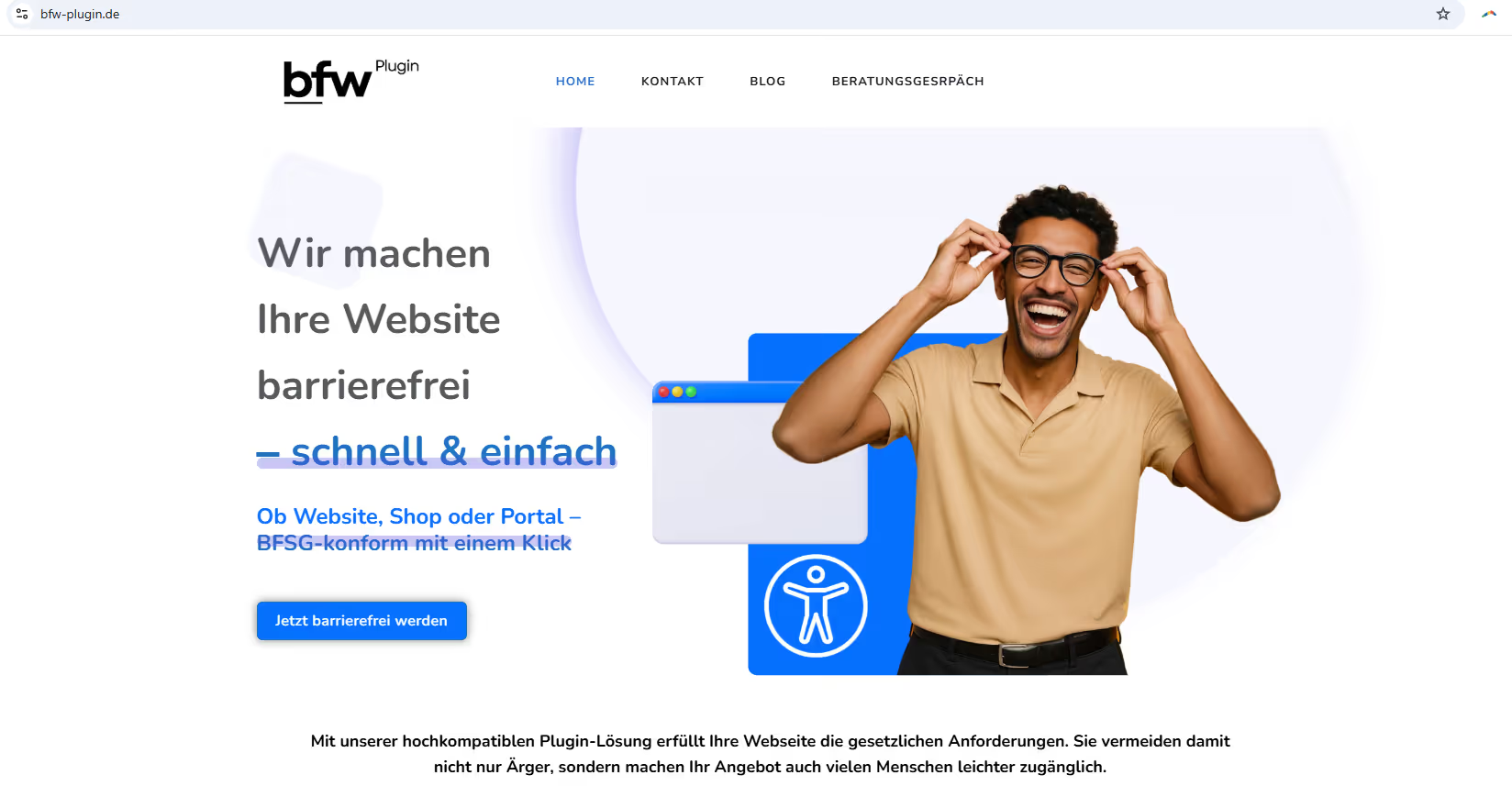
For example, one provider’s website presents the accessibility plugin, which is also distributed to customers via the Händlerbund: BSFG-compliant with one click.
Here is the landing page from the German Retail Federation (Händlerbund) with the accessibility package, where the plugin itself is also conveniently used (see blue icon in the bottom left): “legally secure… a technically accessible presence“.
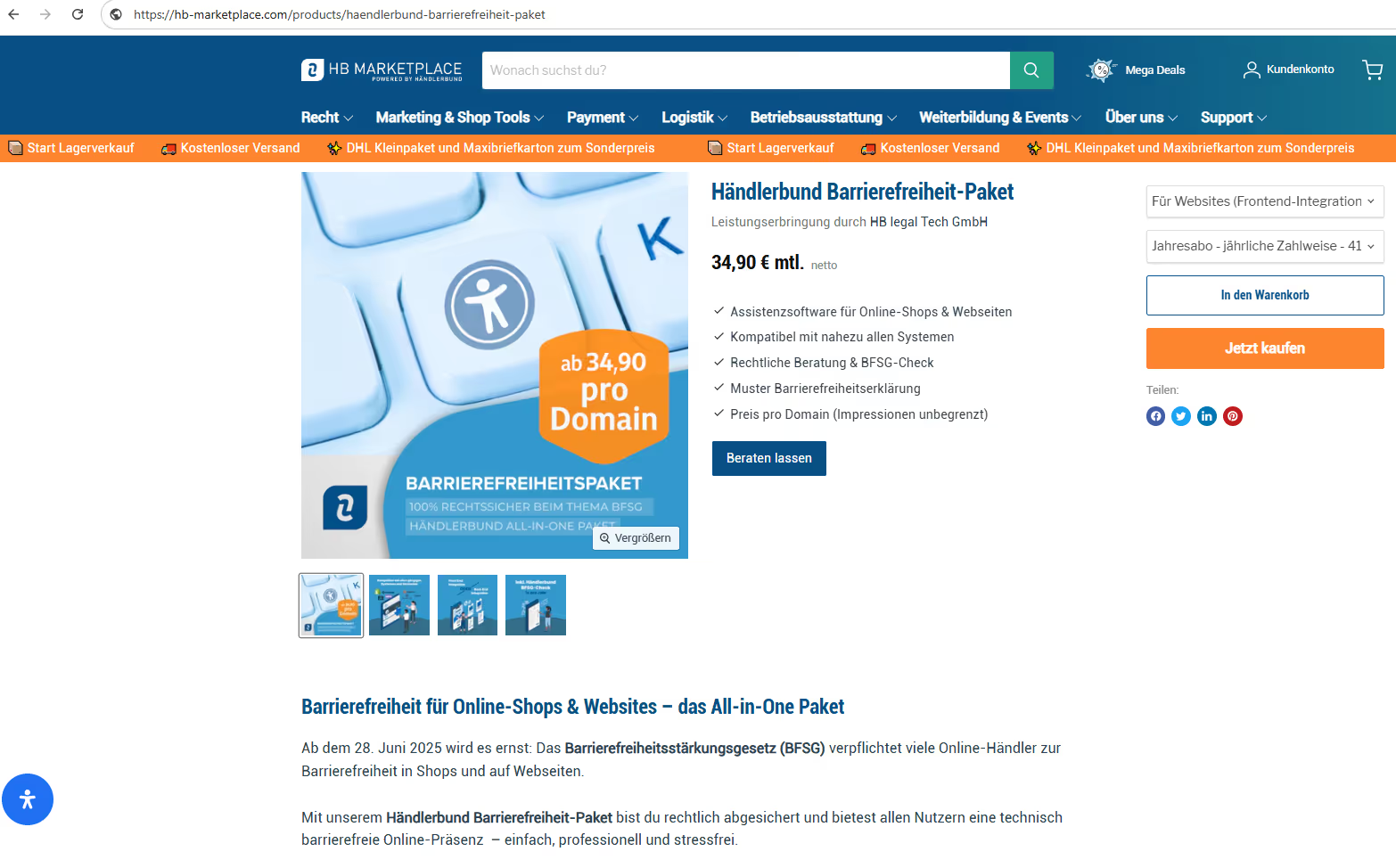
Brief background: We as a company have also been a customer of the Händlerbund (German Retailers Association) since 2018 and value their legal text service and their services related to legal compliance for companies, websites, and online shops. We have also referred several of our customers to the Händlerbund… out of conviction.
We would never use or install this plugin or similar accessibility overlays on our clients’ websites. This report will demonstrate that these “quick and easy” solutions are not only inadequate but actively detrimental to SEO and page speed, preventing websites from actually addressing genuine accessibility issues. Such comprehensive accessibility plugins, on the other hand, introduce a new set of problems that significantly impact website performance, offer no real legal protection, and ultimately hinder true inclusion for users with disabilities.
We would never use or install this plugin or similar accessibility overlays on our clients’ websites. This report will demonstrate that these “quick and easy” solutions are not only inadequate but actively detrimental to SEO and page speed, preventing websites from actually addressing genuine accessibility issues. Such comprehensive accessibility plugins, on the other hand, introduce a new set of problems that significantly impact website performance, offer no real legal protection, and ultimately hinder true inclusion for users with disabilities.
The performance drop: An insight into PageSpeed data
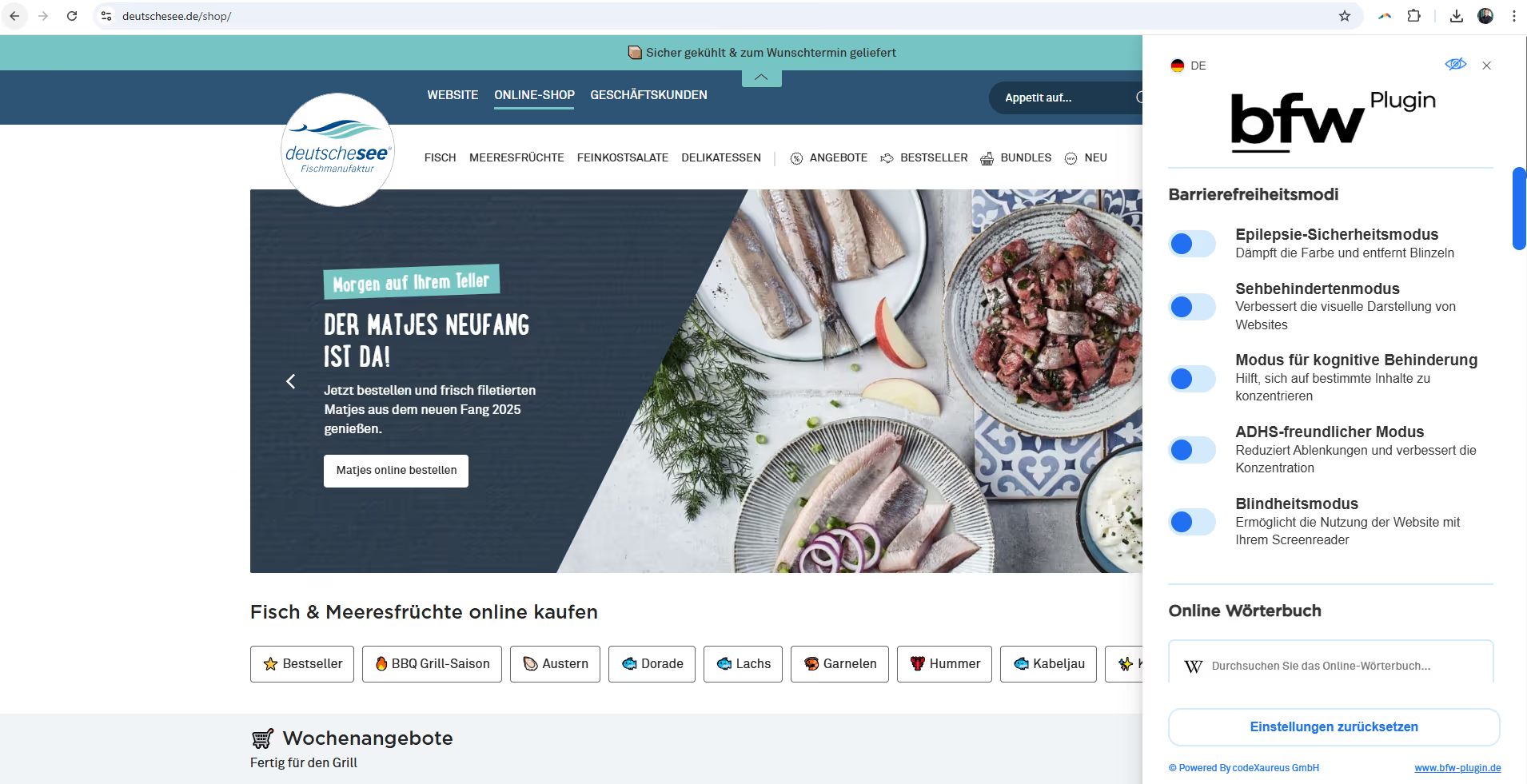
When you visit the Deutsche See online shop, you’ll find a small icon on the right side of the screen to make the accessibility features visible. They’re already loaded, whether you see the panel or not. Click on it and the panel will expand. Take a look at the blue scroll bar on the right… a whole range of features are available to the user as they scroll down.
Understanding the Core Web Vitals (CWV): The foundation of user experience
Google’s Core Web Vitals (CWV) are a set of metrics that measure the real-world user experience and directly influence search engine rankings and user retention. These metrics include Largest Contentful Paint (LCP), which assesses page load performance; Interaction to Next Paint (INP), which measures interactivity; and Cumulative Layout Shift (CLS), which quantifies visual stability.
Here is a PageSpeed Insights analysis for the shop’s homepage: Core Web Vitals were failed due to cumulative layout shifts. We also struggled with CLS issues for several months, which we were only able to fix with considerable effort.
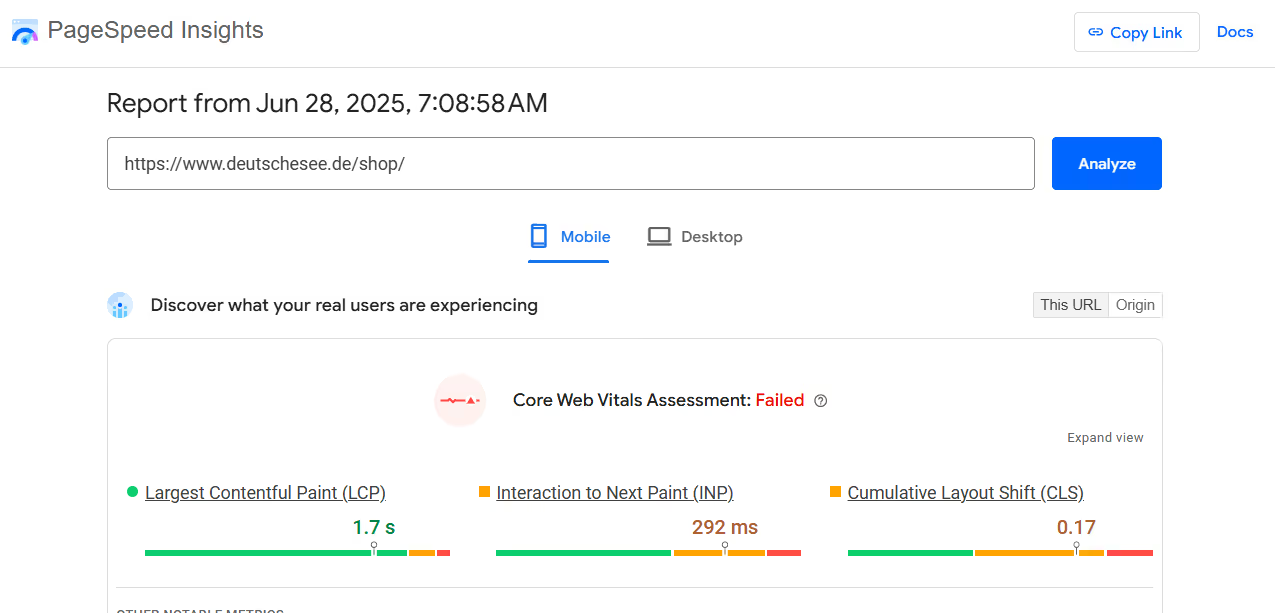
Achieving the lowest – and therefore best – CWV values is essential for a fast, responsive and visually stable website, as this directly affects user engagement and the visibility of your site in search results. The Core Web Vitals are an official ranking factor for Google and were part of the Page Experience Update in 2021.
How accessibility plugins turn into performance bottlenecks
Accessibility overlays are typically implemented as third-party JavaScript files that are dynamically injected into a website’s existing code. This “layered-on” approach, instead of proper integration within the codebase, naturally leads to significant bloat and complexity. Once you look at the feature set of such plugins, you can easily imagine how much of this code gets injected.
These plugins introduce a considerable amount of additional JavaScript and CSS that the browser must download, parse, and execute before the page can be fully rendered. And in the example of Deutsche See, we can see that the code is already being loaded even before the icon is clicked. In other words, the code is already included during the initial load. And this is what the result of the PageSpeed test for mobile looks like:
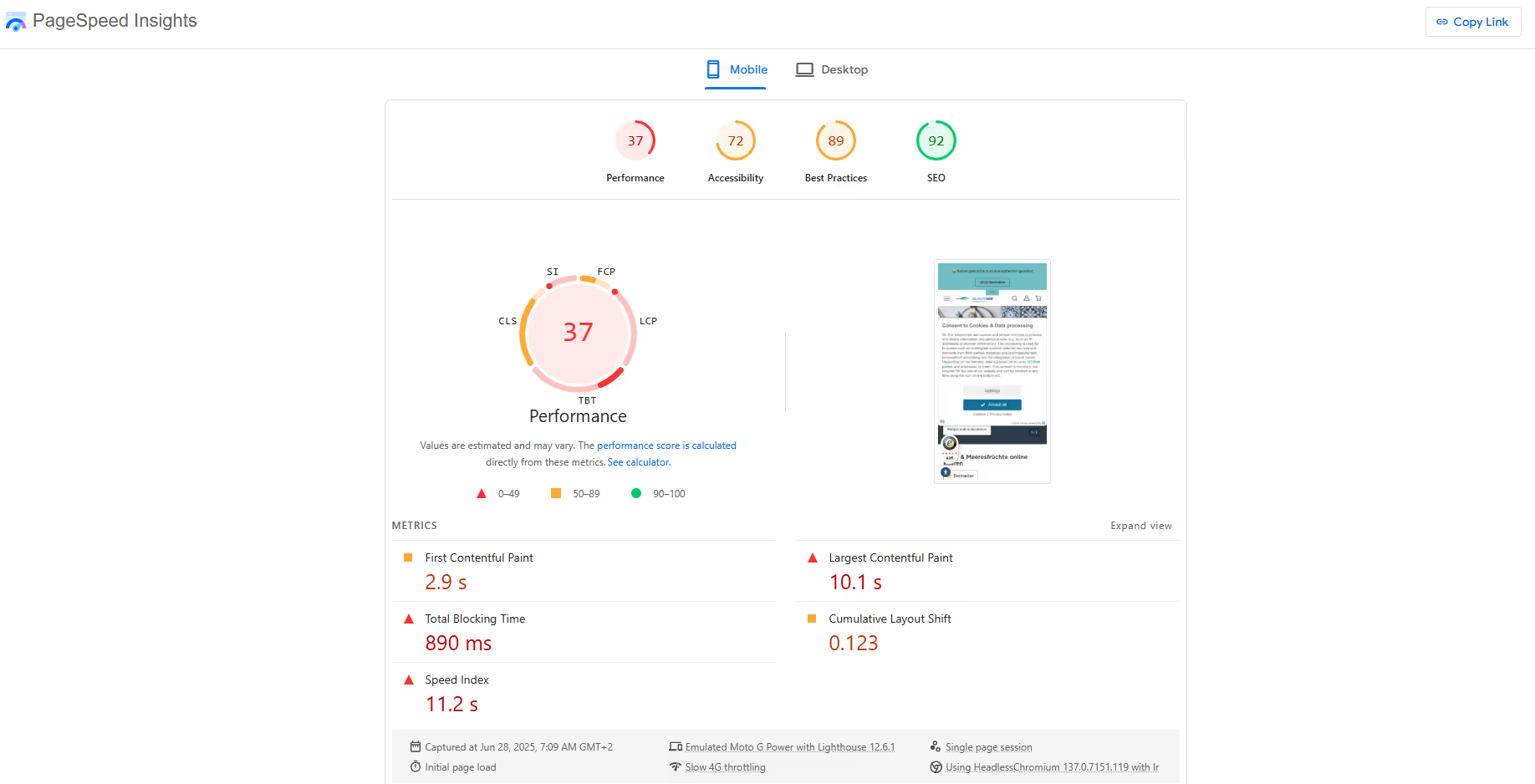
Not only is the mobile PageSpeed of 37 particularly bad, but tellingly, Google also assigns the website only a mediocre accessibility score of 72.
On desktop, nearly every website typically achieves a good PageSpeed score. Green is the standard, and yellow is already almost rare. But Deutsche See managed to miss even that. A real tragedy. And the accessibility score has dropped even further.
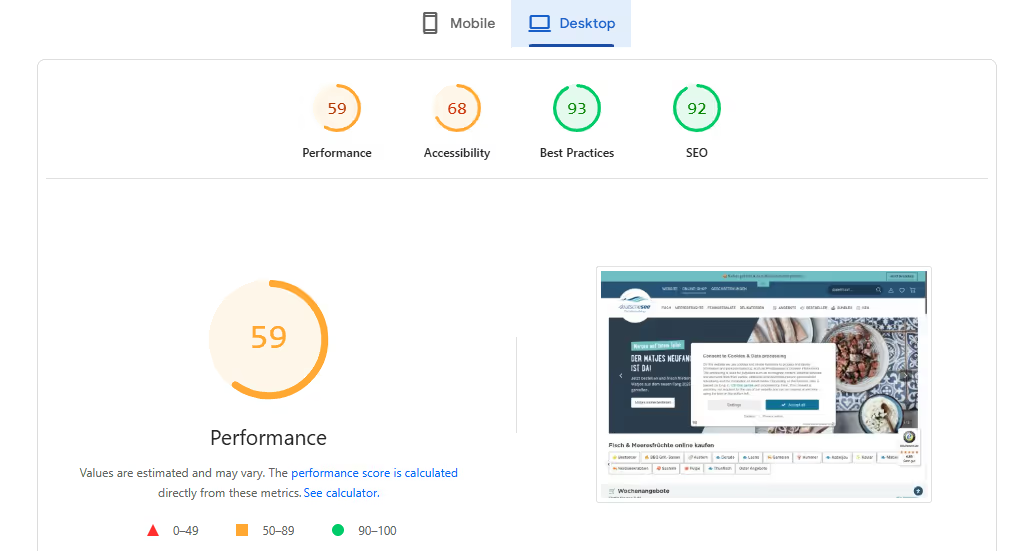
Accessibility plugins add “unnecessary layers” and create heavy scripts and third-party dependencies, which directly contribute to increased loading times. The browser’s main thread is responsible for critical tasks such as parsing HTML, applying styles, and executing JavaScript. Overlays often monopolize or block this main thread, significantly delaying the rendering of visible content and hindering user interactivity.
The dynamic injection of numerous additional elements and styles can lead to an excessively large DOM. Combined with the large file sizes of the plugin assets, this results in massive network payloads, further worsening slow page loads — especially for users on slower connections or mobile devices.
In the list of recommendations for fixing these issues in the PageSpeed Insights report, I’ve marked with the blue icon where the diagnostic report explicitly references the scripts of the accessibility plugin by name as part of the problem.
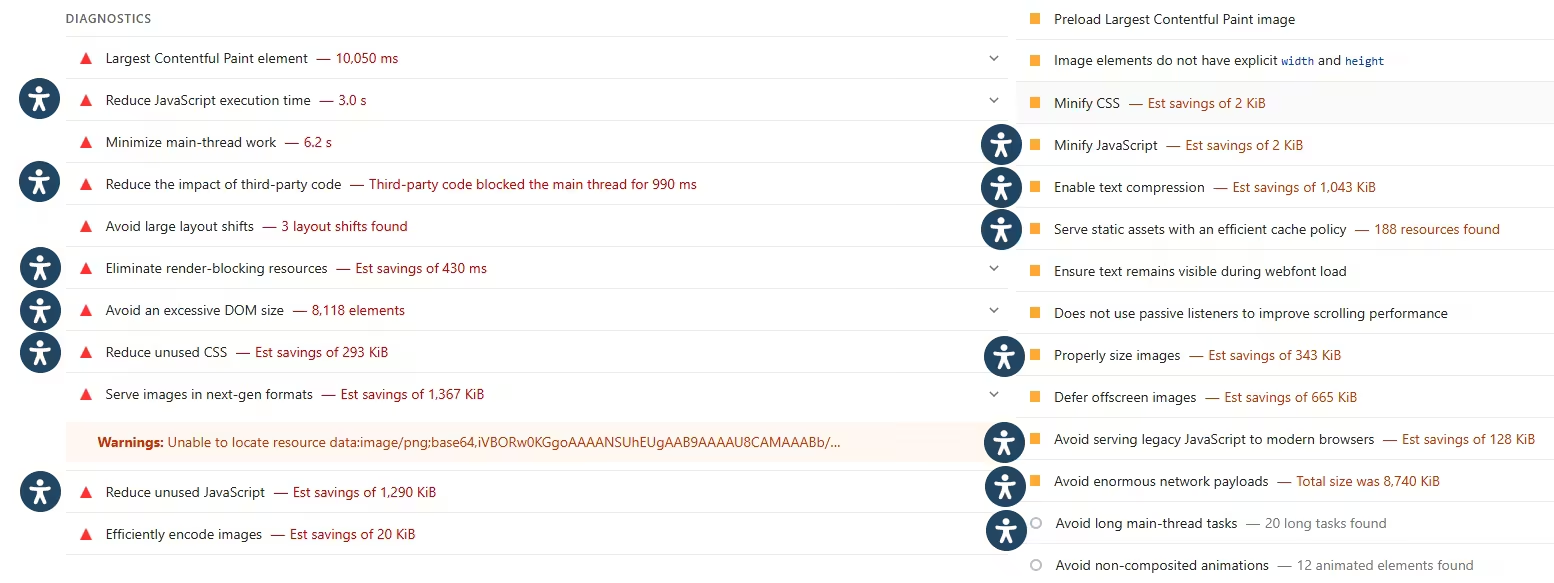
The technical architecture of this accessibility overlay directly leads to a deterioration in performance, along with all the disadvantages for user experience and SEO. These types of overlays work by injecting large amounts of JavaScript and CSS into a website’s existing structure. This injection increases the total amount of data transferred (network payload) and adds numerous elements to the Document Object Model (DOM size). Another issue is that these scripts also bring along a lot of unnecessary code that either shouldn’t be there or shouldn’t be loaded yet.
Here is the analysis when “Reduce unused CSS” and “Reduce unused JavaScript” are expanded.
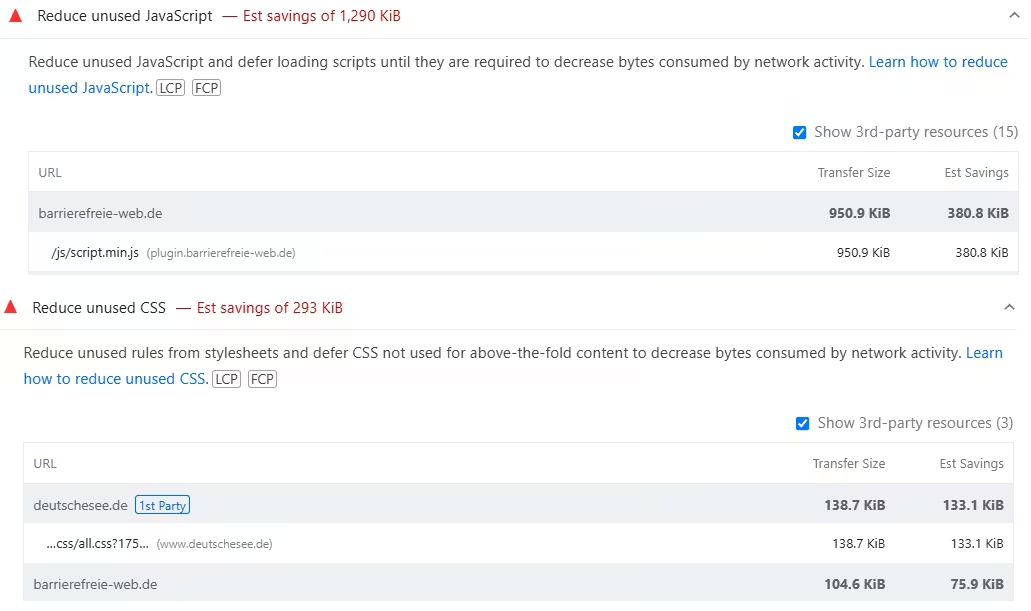
The accessibility plugin loads a large JavaScript bundle (950 KiB) on page load, even when the panel has not been used at all. The panel is only activated once the blue icon is clicked. And only then are many of the functions actually executed.
A better solution would be for a lightweight JavaScript file to initialize only the icon. Then, upon clicking, the full panel and its functionality would be loaded on demand.
Here the situation is different: for the browser to render the page on load, it must process and execute the newly injected, often unoptimized third-party code from the accessibility plugin. This intensive processing directly increases JavaScript execution time and puts additional strain on the main thread. These are absolutely critical factors for the Core Web Vitals.
PageSpeed Insights shows very poor performance values, with a negative impact explicitly attributed to the accessibility plugin being used. Is it only this bad on deutschesee.de, or have other customers implemented it more effectively? Let’s look at a few more corporate websites that use the bfw plugin — from left to right: trelino.com, hb-marketplace.com (by Händlerbund), christopeit-sport.com, and ottowildegrillers.com.
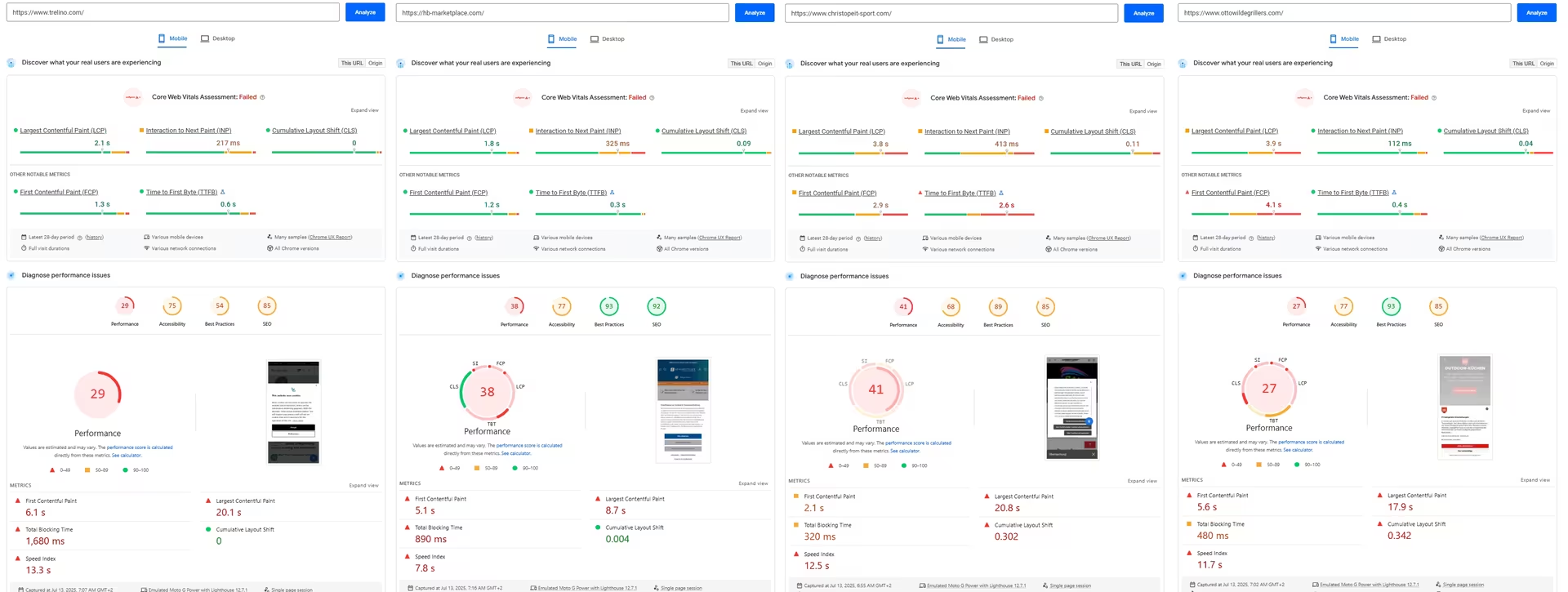
The scores are consistently in the red. None of the websites meet the Core Web Vitals. The plugin alone is not responsible for these negative performance values. All analyzed sites have additional issues that prevent optimal PageSpeed scores. But the overlay pulls the handbrake even further.
The diagnostic hints from PageSpeed Insights are direct confirmation of the theoretical performance problems associated with accessibility overlays. These concrete data points show that these plugins actively undermine a website’s core performance metrics, leading to measurable negative impacts on user experience, SEO, and potentially conversion rates.
I am not questioning the fundamental functionality of the plugin in helping people with impairments better access content, but…
- … the entire code (in this case: 1.2 MB just for the plugin — an absolute performance killer) is still loaded in full before the user does anything at all.
- … many users never use the panel at all. The code is therefore unnecessary bloat.
- … the LCP (Largest Contentful Paint), one of the key Core Web Vitals metrics, suffers because the JS and CSS block or delay the rendering process.
- … there is no lazy loading, no code splitting, and no dynamic loading whatsoever.
In conclusion, from a technical perspective, the plugin feels like an overkill. It adds a significant amount of bloat without any clear indication of which accessibility features are actually being used in a meaningful way.
How misleading is the provider’s self-promotion on their website in this context, with the supposedly advantageous claims about using the tool:
- Improved reach and SEO: accessible websites rank better.
- Better user experience: for all visitors — regardless of impairments.
The performance loss caused by the accessibility tool is so severe that the user experience noticeably deteriorates — with predictable consequences for rankings. One can only hope that the SEO teams at Deutsche See & others do not attribute the issue solely to the heavily discussed AI Overviews, which have caused traffic drops for many websites since their rollout, but also recognize the direct connection between technical overhead and loss of visibility.
The compliance dilemma: why accessibility overlays fail when it comes to real inclusion
The limited scope of automated fixes: a band-aid, not a cure
The promise of a “fully automated” accessibility solution is a dangerous misconception. Automated tools and overlays are inherently limited and can detect only a fraction of actual accessibility issues.
These tools focus primarily on superficial changes, such as modifying colors or adjusting text size. Yet these are features that users with disabilities often already control through their operating system or browser settings. The crucial point is that overlays cannot fix the underlying structural issues embedded in a website’s HTML, CSS, and ARIA roles. They cannot effectively address complex problems such as improper heading structures, missing or incorrect ARIA labels, or providing truly meaningful alternative text for images, because they lack the human context and interpretive ability required to do so.
Overlays address symptoms, not causes. True web accessibility is rooted deep within the semantic structure and logical flow of a website’s code, not merely in its visual presentation. By design, overlays inject a layer of code on top of the existing site rather than modifying the core HTML, CSS, and JavaScript. This means they can make superficial adjustments (e.g., contrast changes), but they cannot fix fundamental structural issues such as incorrect heading hierarchies, illogical reading orders, or dynamic content problems that require direct code modifications.
Here is an analysis of deutschesee.de from the SEOBILITY on-page crawler, including a small selection of the issues detected:

How does the accessibility tool solve the issues with headings and hierarchical structure? What does the plugin do about the missing alt attributes on images? None of this is addressed by the plugin — otherwise the crawler would not have detected these errors. Worse still: the plugin itself delivers an image without an alt attribute, as shown in the following screenshot, where PageSpeed Insights flags both the popup image and the plugin’s logo on the shop’s homepage as missing alt text.
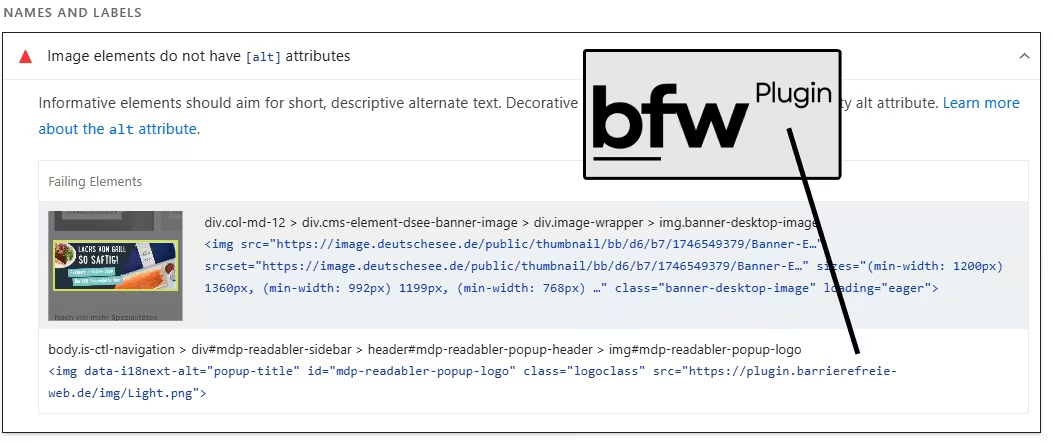
This limitation means that they merely patch visible symptoms while the vast majority of complex accessibility issues remain unaddressed. This creates a false sense of security and leads to what can be described as a compliance theater—the appearance of conformity without actual compliance.
No accessibility for embedded videos, iFrames, or PDF files
Deutsche See states this themselves in their accessibility declaration, summarizing very clearly several additional areas where the accessibility plugin provides no help.
Despite our efforts, the content listed below is not accessible:
- PDF documents: Some of our PDF documents are not accessible. We are working to provide an adapted version or accessible alternatives as soon as possible. If you need a specific PDF file from us that is not yet available in an accessible format, please let us know.
- Videos: Some of our embedded videos currently do not have subtitles. We are working to provide subtitles for all videos as soon as possible.
- Images without alternative text: some images on the website do not have alternative text. We are working to update them as soon as possible.
- iFrames: Parts of the content on our website are embedded via iFrame for technical reasons and are therefore not accessible.
Regarding the images without alt text, enough has already been said (see above). Providers of booking platforms who supply iFrame- or API-based booking widgets for hotel, vacation rental, or boat websites must also take action to avoid creating accessibility issues for their customers.
Videos should have subtitles or transcripts. This becomes a problem whenever a video is not embedded via YouTube, where subtitles can easily be enabled.
PDFs should also be accessible, which becomes an issue when many PDF files exist. We have made the PDF documents integrated on several clients’ websites accessible as well. The time required was, honestly, higher than expected. PDF files can be tested using this PDF accessibility checker.
Impairment of assistive technologies and user experience
A critical issue is that accessibility overlays often interfere with the assistive technologies (AT) they are supposedly meant to support, such as screen readers, keyboard navigation tools, and magnifiers.
Users with disabilities configure their devices and assistive technologies carefully to meet their specific needs. Overlays can override these personalized settings, forcing users to adapt to an unfamiliar system on every website. This leads to a poor user experience and ultimately makes websites more frustrating and less usable. The disability community has been overwhelmingly opposed to overlays. A WebAIM survey found that 72% of disabled users rated these tools as “not effective at all or not very effective” … and only 2.4% considered them effective.
Overlays create new barriers for the very users they are meant to help. Screen readers are designed to interpret the underlying semantic structure of a webpage (HTML elements, ARIA attributes) in order to convey information to users. Many websites that rely on overlay solutions do not have clean semantic structure in their code. Important attributes such as aria-label are missing altogether. And this is where the problem lies: assistive technologies like screen readers rely on this information to guide users through content.
When an overlay simply adds visual features on top via JavaScript instead, nothing changes about the actual structure. Overlays often fail to correctly update this underlying semantic structure, or may even conflict with it by injecting JavaScript and applying superficial visual adjustments.
The result is that a tool intended to improve accessibility paradoxically creates new, frustrating barriers for exactly the people who rely on assistive technologies, thereby worsening rather than improving their user experience. In the end, it produces a deceptive surface that looks good but can break essential functions needed by assistive technologies.
The strong stance of the disability community
The disability community, along with a large majority of accessibility experts and assistive technology providers, has overwhelmingly and unequivocally spoken out against the use of accessibility overlays.
This collective opposition is significant: as of July 12, 2025, more than 970 accessibility experts and people with disabilities have signed an open letter condemning their use.
Many users actively use ad blockers to prevent overlays from loading. This strong stance stems from the fact that overlays often create more barriers, interfere with existing preferred assistive tools, and can even raise serious privacy concerns by automatically detecting and potentially logging the use of assistive technologies without the user’s explicit consent.
Features that bloat the site but are not actually needed
When looking at the range of features offered by the BFW plugin, it is impressive on one hand what the developers have built to provide users with an enhanced view of the website. On the other hand, it raises the question of what users actually need, since many features — such as text resizing, color contrast adjustments, etc. — are already provided by the browser (for example, Chrome’s built-in reader mode) or by screen readers themselves.
The new code injected by overlays into the existing code structure not only slows down PageSpeed but is also not aligned with the website’s layout conditions. Here is an example of the view when the dyslexia mode is activated: on three products, the product title is cut off, and in the highlights section, the space within the green image teasers is no longer sufficient for the text. What is intended to be helpful for users with dyslexia actually makes accessing the information more difficult.
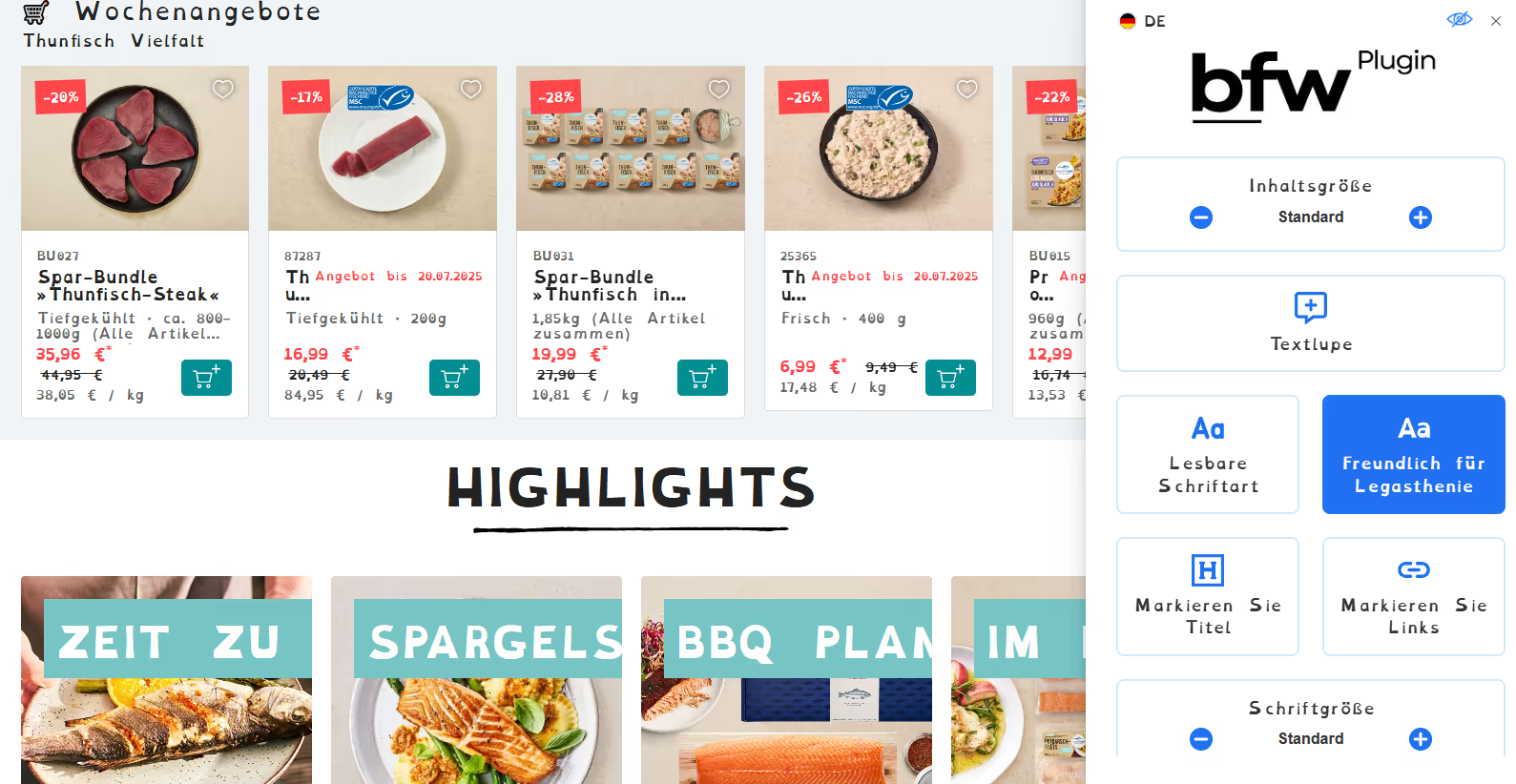
The heavy overbloat could have been avoided if each feature had been seriously evaluated for its actual usefulness.
There is another notable issue. The font that appears when the “Friendly for dyslexia” button is activated is called Open Dyslexic. It was originally developed with the hypothesis of improving readability.
At the Axe-Con 2021, the Readability Group presented its large-scale typography study, in which it tested the effectiveness of 20 different fonts with 2,022 participants — including more than 250 people with pronounced dyslexic characteristics. Axe-Con is an annual international online conference dedicated exclusively to digital accessibility. The Readability Group is an independent research and consulting organization specializing in readability, typography, and accessible font design.
The goal of the typography study was to use real user data to determine which fonts are truly readable and which merely carry the label “accessible.” Each font was viewed more than 16,000 times across roughly 7,000 hours of testing. Here is the list of the 20 fonts, starting with the one that received the highest approval.
- BBC Reith Sans 65%
- SF Pro 65% … Apple developed SF Pro internally because Helvetica Neue appeared too cramped on iPhones.
- Verdana 64% … I remember well that many websites chose this font 20 years ago. Verdana was designed specifically for Microsoft for low-resolution monitors. The letters were made particularly wide to ensure clarity even on CRT displays.
- Segoe UI 62%
- Legend Decca 62%
- Atkinson 60%
- Red Hat Text 60%
- Roboto 57% … a Google font. We already use it in several client projects as well.
- FS Me 56%
- Calibri 55% … for many years the default Microsoft font after it replaced Times New Roman in 2007.
- BBC Reith Serif 54%
- Ubuntu 54% … we also use this on our agency website. You are reading this line in that very font right now.
- Helvetica 47% … everybody’s darling.
- Roboto Slab 47%
- Lexie Readable 44% … specifically developed to improve readability for people with dyslexia.
- Times New Roman 36%
- Sylexiad Sans 36% … specifically developed to improve readability for people with dyslexia.
- Dislexie 30% … specifically developed to improve readability for people with dyslexia.
- Comic Sans 28% … the ugliest font ever.
- Open Dyslexic 18% … specifically developed to improve readability for people with dyslexia.
Interestingly, the fonts with the lowest scores among dyslexic participants were precisely the ones that were “designed” for their benefit. The dyslexia mode ends up offering users the font with the lowest approval rating. This again illustrates the pattern we see with accessibility overlays: well-intentioned, off target, and unnecessary.
What do the accessibility testing tools say about deutschesee.de?
The Accessibilitychecker.org audit for the deutschesee.de shop provides objective data illustrating the failure of plugins to deliver real accessibility. Despite loading an accessibility plugin, the website received a miserable “Audit Score: 29%” and was explicitly marked as “NOT COMPLIANT” under “Germany law.”
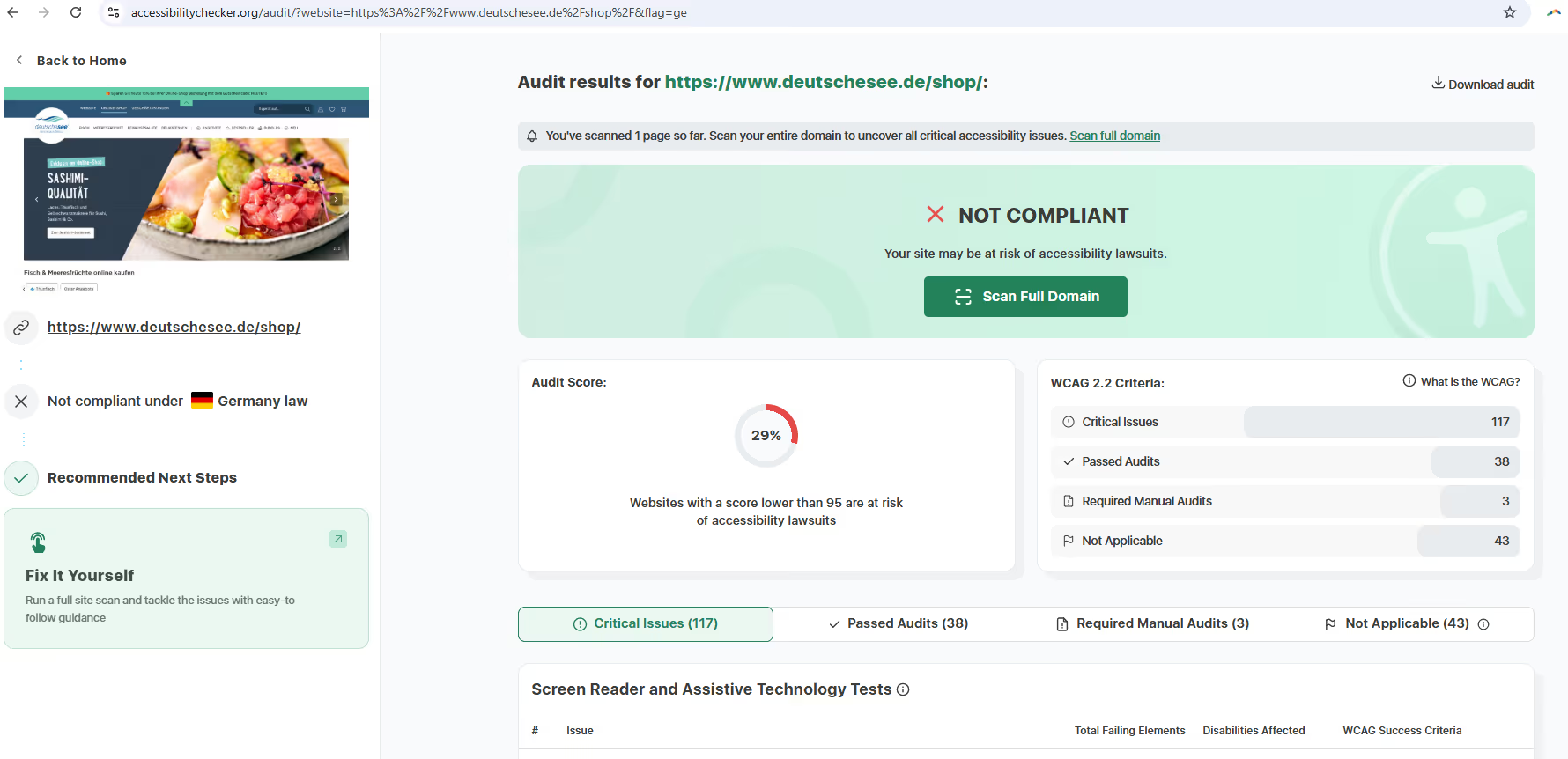
The audit also reported 117 critical issues for the tested shop subpage alone and indicated that the website fails to meet numerous WCAG criteria. Notably, Accessibilitychecker.org did not even recognize the overlay in this case — something it does detect with other tools. The irony: the Händlerbund’s own marketplace site, where the accessibility plugin is offered, also fails the audit.
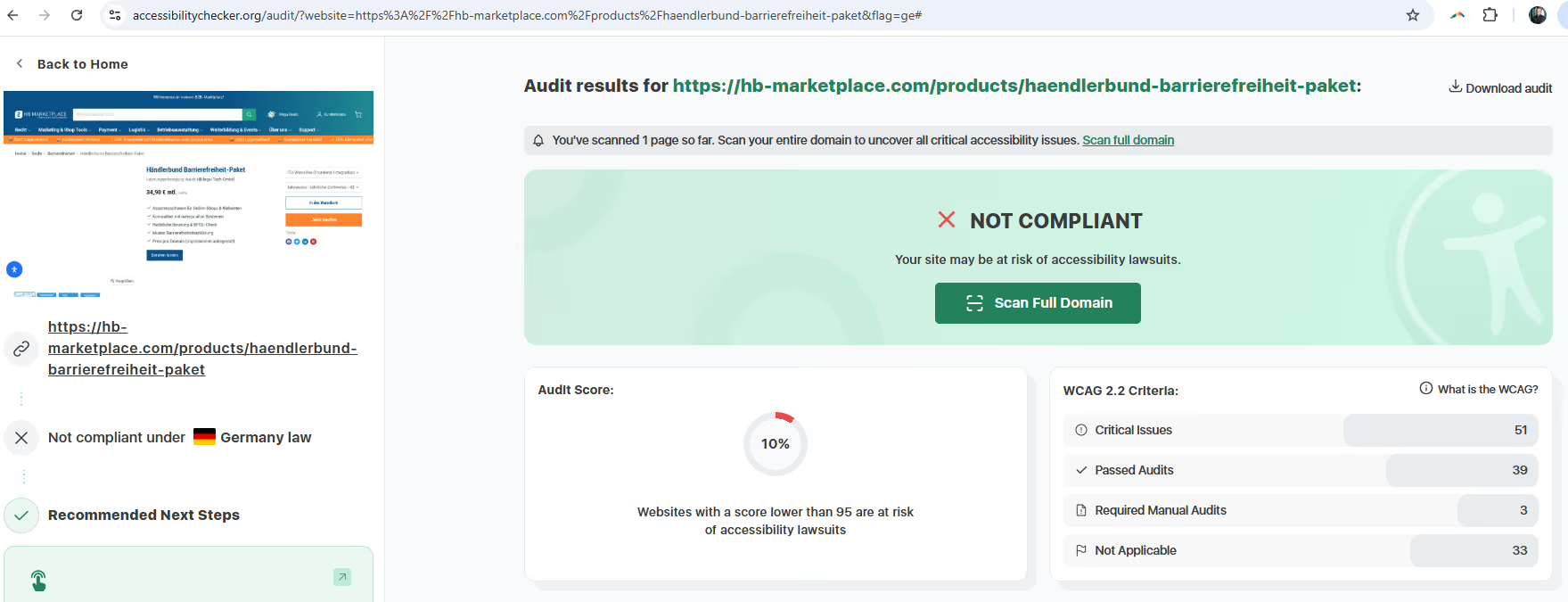
Nevertheless, a limited portion of the identified issues are in fact addressed by the plugin — such as color contrasts that are currently too weak. Other issues, however, such as missing alt text, missing ARIA labels, and the absence of accessible names for buttons, are not resolved by the plugin … precisely the kinds of information that are essential for visually impaired users relying on screen readers.
The following table compares how overlays and code-level solutions handle the WCAG principles:
| WCAG-Prinzip | Barrierefreiheits-Plugin/Overlay | Code-level solution |
| Information must be presented in a way that users can perceive it. | Superficial visual changes; cannot interpret the context needed for meaningful alternative text, video captions, or complex dynamic content; often generate inaccurate descriptions. | Semantic HTML, comprehensive alternative text, accurate captions/transcripts, sufficient color contrast, and responsive design built directly into the code. |
| User interface components and navigation must be operable. | Often interfere with existing assistive technologies (AT) and override user settings; force users to adapt to an unfamiliar system; may hinder keyboard navigation. | Full keyboard navigation, clear focus indicators, logical tab order, no “keyboard traps,” proper handling of dynamic content — all implemented directly in the code. |
| Information and the operation of the user interface must be understandable. | Can disrupt the logical structure and reading flow for AT users; often generate unclear or redundant information. | Clear, concise language; consistent and predictable navigation and layout; meaningful heading structures; clear link text and form fields, all anchored directly in the code. |
| Content must be robust enough to be reliably interpreted by a wide range of user agents, including assistive technologies. | Based on JavaScript that can be disabled; may become incompatible with future AT updates; do not modify the underlying code, which limits long-term compatibility. | Use of standards-compliant, semantic HTML and ARIA; continuous maintenance and testing to ensure compatibility with evolving technologies; accessibility is part of the core structure. |
This table highlights the fundamental differences in approach and effectiveness between overlays and code-level solutions.
Limited improvements are possible through plugins and overlays
If you’re wondering what percentage of the path toward compliance plugins and overlays can actually cover, a rough rule of thumb is around a 40% improvement.
Skynet Technologies offers a mode that adds the plugin’s impact to the score. Here as well, a free check can be performed for a single subpage. For Deutsche See, the result comes out to just under 57 percent and a status of Semi Compliant.
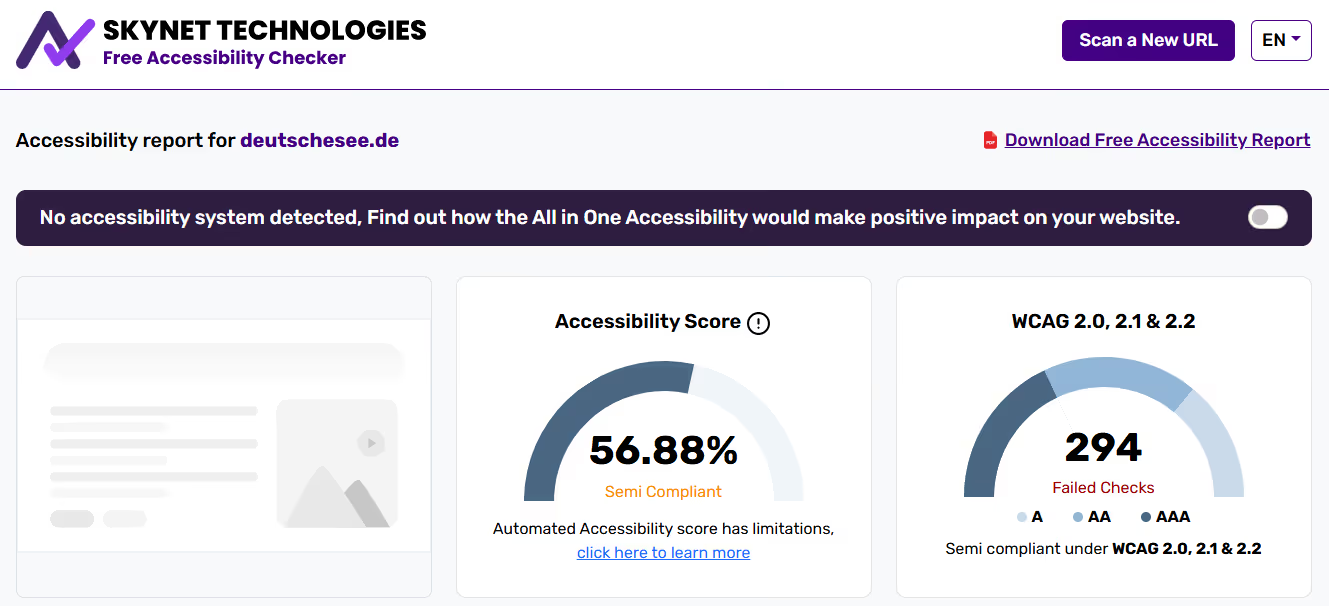
https://freeaccessibilitychecker.skynettechnologies.com/?website=deutschesee.de
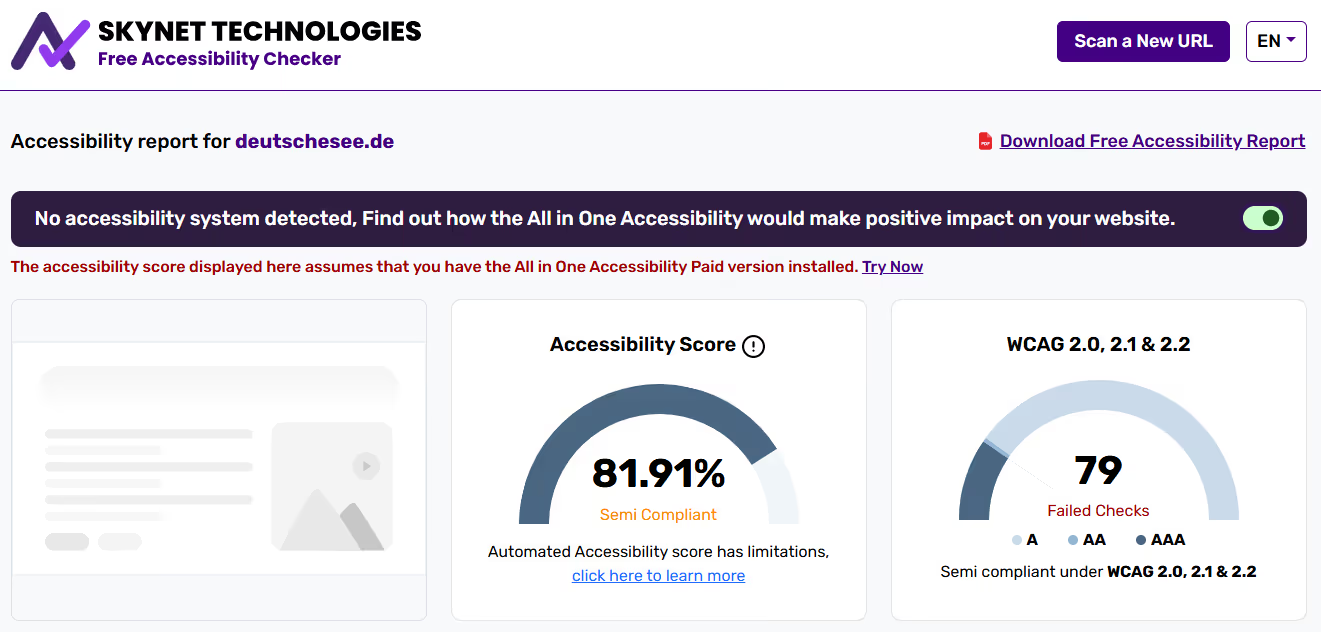
What is particularly interesting is the switcher in the top right, which simulates how many issues would be resolved using Skynet Technologies’ All in One Accessibility tool in the paid version. More than 200 issues can be fixed. The score increases by over 25 percentage points — but it still remains in the Semi Compliant status.
Seductive or misleading marketing by the providers?
Compliance plugins are a marketing promise that should be approached with caution. Website owners often assume that the plugin ensures legal compliance. But it appears they do not. The larger implication is that companies are not only purchasing and implementing a flawed technical solution, but are actively investing in a legal risk.
Accessibility overlays do not fulfill their primary advertised purpose of ensuring legal compliance. This confirms the widely shared expert consensus that these tools create a false sense of security and do not protect against non-compliance.
What is particularly interesting is the difference in communication when promoting accessibility plugins between established American providers—who have already encountered legal boundaries in a highly litigious environment—and the new gold rush players in the German market. Skynet Technologies and AccessiBe, the latter having been fined 1 million dollars, promote their tools on their websites with statements such as:
- supports businesses in improving accessibility
- improves accessibility
- reduces legal risks
The only thing that can be done here in just a few clicks or in two minutes is integrating the tool into the website — but not achieving accessibility. And the providers state this quite openly.
The new German tool providers, which are springing up like mushrooms, communicate quite differently. The BFW plugin, for example, makes bold claims:
- Whether website, shop, or portal — BFSG compliant with a single click
- With our highly compatible plugin solution, your website meets the legal requirements.
- Secure your legally compliant and accessible website with our plugin — quickly and easily.
- With our plugin, you avoid legal risks and improve the user experience for ALL visitors.
- With our plugin, you can integrate accessibility into your existing website within just a few minutes. Only two lines of code — instant inclusion and legal certainty.
- Legal compliance: meets all requirements of WCAG 2.1 and BITV 2.0.
- Activate accessibility in just a few minutes.
- With our certified plugin, you can make your website accessible in just a few minutes — legally compliant, secure, and without any programming effort.
With our certified plugin, you can make your website accessible in just a few minutes — legally compliant, secure, and without any programming effort.
The competitor AccessGo makes promises such as:
- … meet legal requirements easily, quickly, and without stress.
- … implement the requirements automatically and in full legal compliance — with no technical effort at all.
In the accessibility statement of the companies that actually use this tool, the claims are walked back. A good example is the website of Eintracht Braunschweig, which uses the AccessGo plugin. When you visit the site, you immediately encounter the first accessibility barrier: the icon for the accessibility plugin is currently still covered by the cookie banner. In addition, the cookie banner is displayed in English because it responds to the browser language — even though I am on the German Eintracht website.
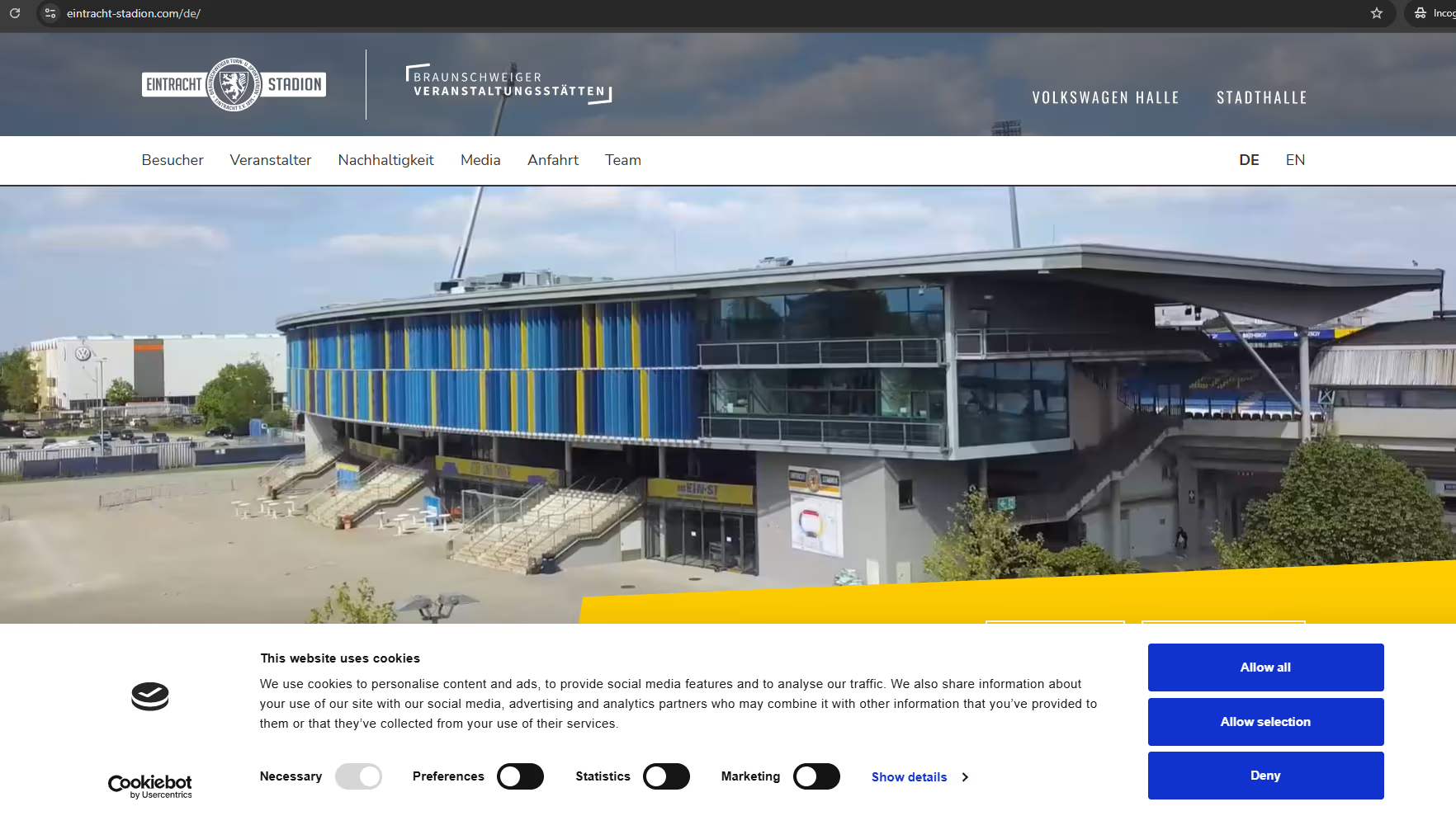
Cookie banners are unfortunately often not readable by screen readers, which is a point frequently criticized by the visually impaired community.
If you look at the accessibility statement on the website, it says:
How accessible is this service?
The assessment is based on a self-evaluation with the support of the Accessibility Tool from AccessGO.
Based on this review, the website is partially accessible with respect to the requirements mentioned above.
Specifically, the following points are not fully compliant with the accessibility regulations that apply to us:
Barrier: Some buttons are empty or contain no descriptive text.
Barrier: Some links are empty or contain no text, making their purpose or function unclear.
Barrier: Some images are empty or contain no descriptive text.
We are currently planning the implementation of measures to address these barriers.
From a marketing perspective, AccessGo has played it cleverly. Companies obligated to provide accessibility are promised a quick and easy way to meet WCAG requirements. Legal certainty with just a few clicks. So agencies and/or companies opt for a tool — but in the end, only semi-compliance is delivered. After installing the plugin, numerous problems remain, which are then disclosed in the accessibility statement. Is that enough to prevent fines or legal warnings? Honestly, I don’t know. Time will tell.
Psychologically, the company name presented in the footer for the AccessGo tool was also chosen cleverly: German Society for Accessibility.
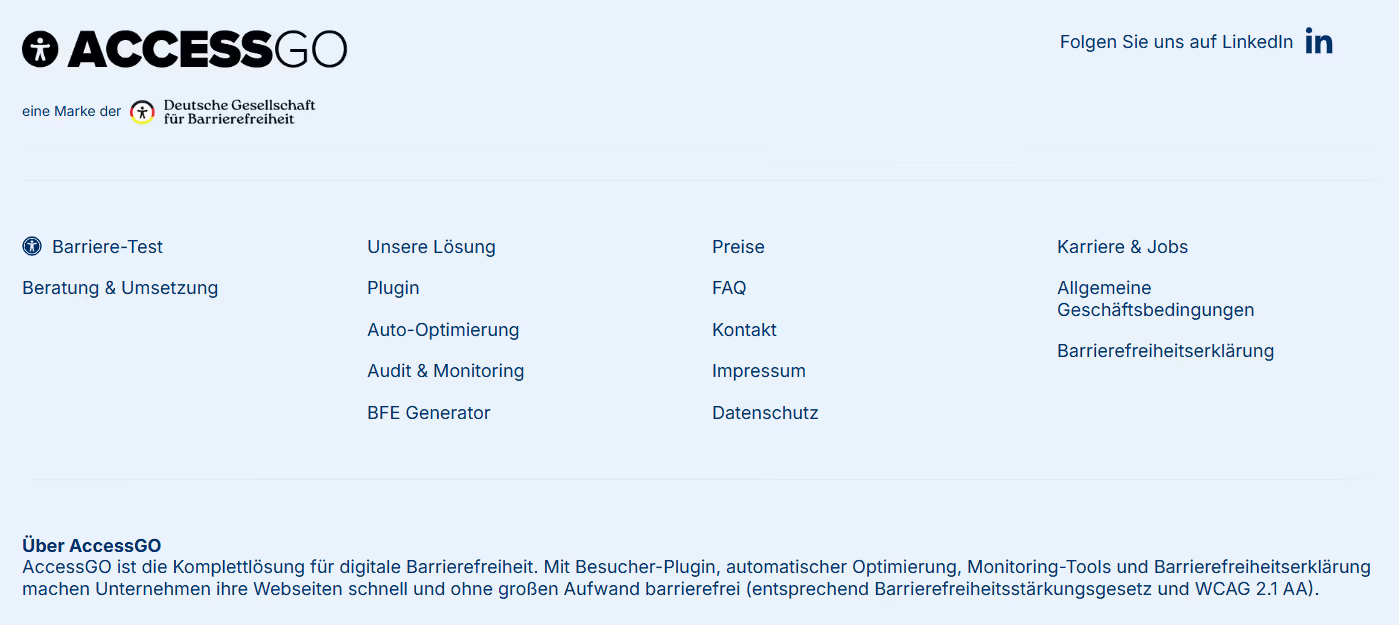
Nothing less would do. The name immediately evokes real institutions such as the German Society for International Cooperation or the German Society for Psychology, or societies for nutrition, palliative medicine, and other well-known organizations where members exchange ideas and work toward societal improvements within the field. The key difference, however, is that the German Society for Accessibility is not an association or a foundation, but a limited liability company (GmbH) that was only entered into the commercial register in March 2025.
At least 100 companies are already using the tool, attracted by the promise of quick fulfillment of WCAG requirements and legal compliance — accessible quickly and with minimal effort, as stated in the footer below. As a company, you naturally want to choose the right tool. To the great (sales) fortune of the provider, the tool had already received top ratings on three platforms in January 2025 — even before the company itself was founded — from three identical usernames: Patrick, Laura, and Anonymous.
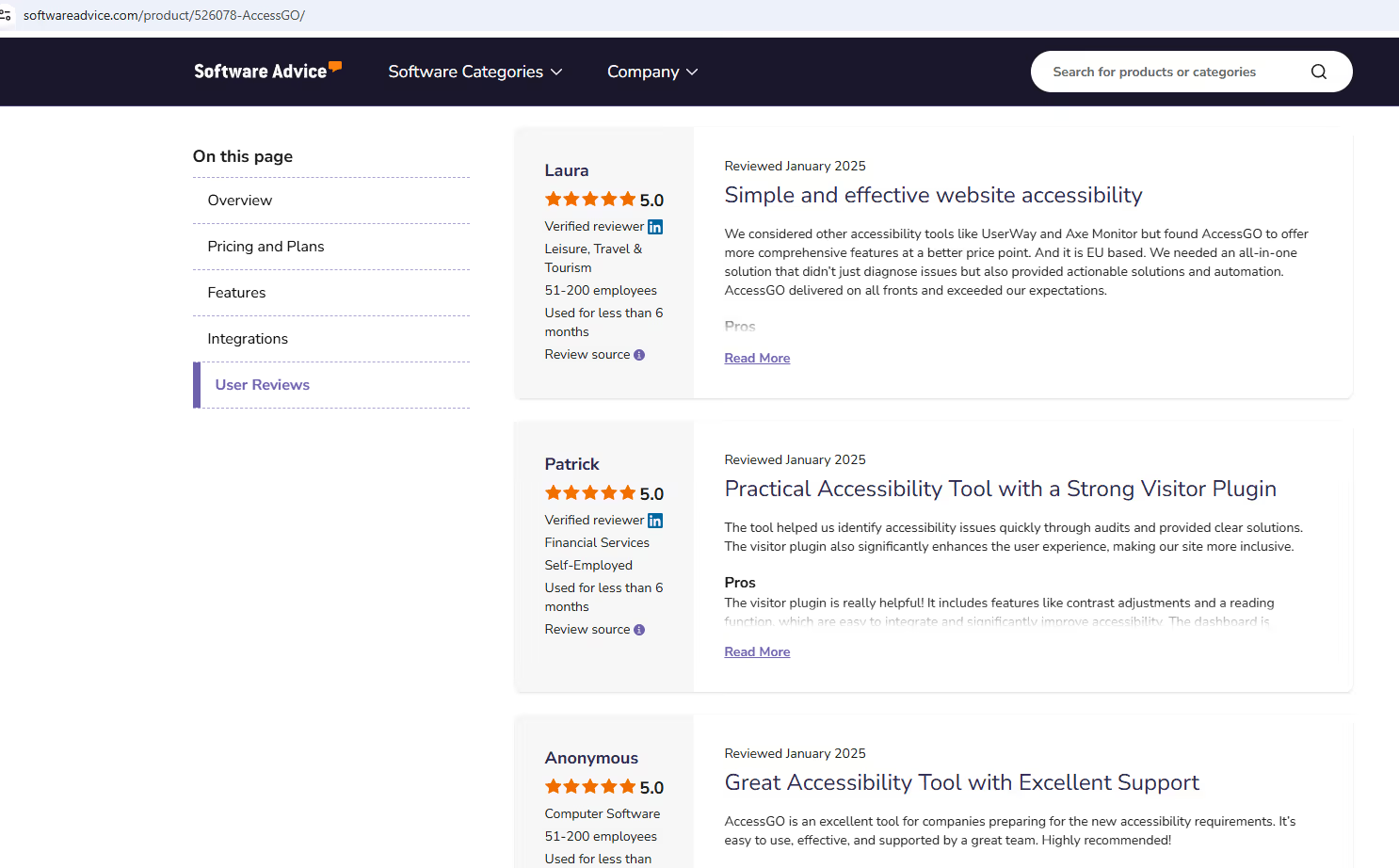
This allowed them to promote the tool on their website with “customer” reviews right from the start.

We as an agency are honestly already grateful when clients leave a Google review. But a client posting their praise on three review platforms at once — that is the new gold standard for me from today onward.
It becomes truly crude when you look at the testimonials for the BFW plugin, which is actively promoted by the Händlerbund.
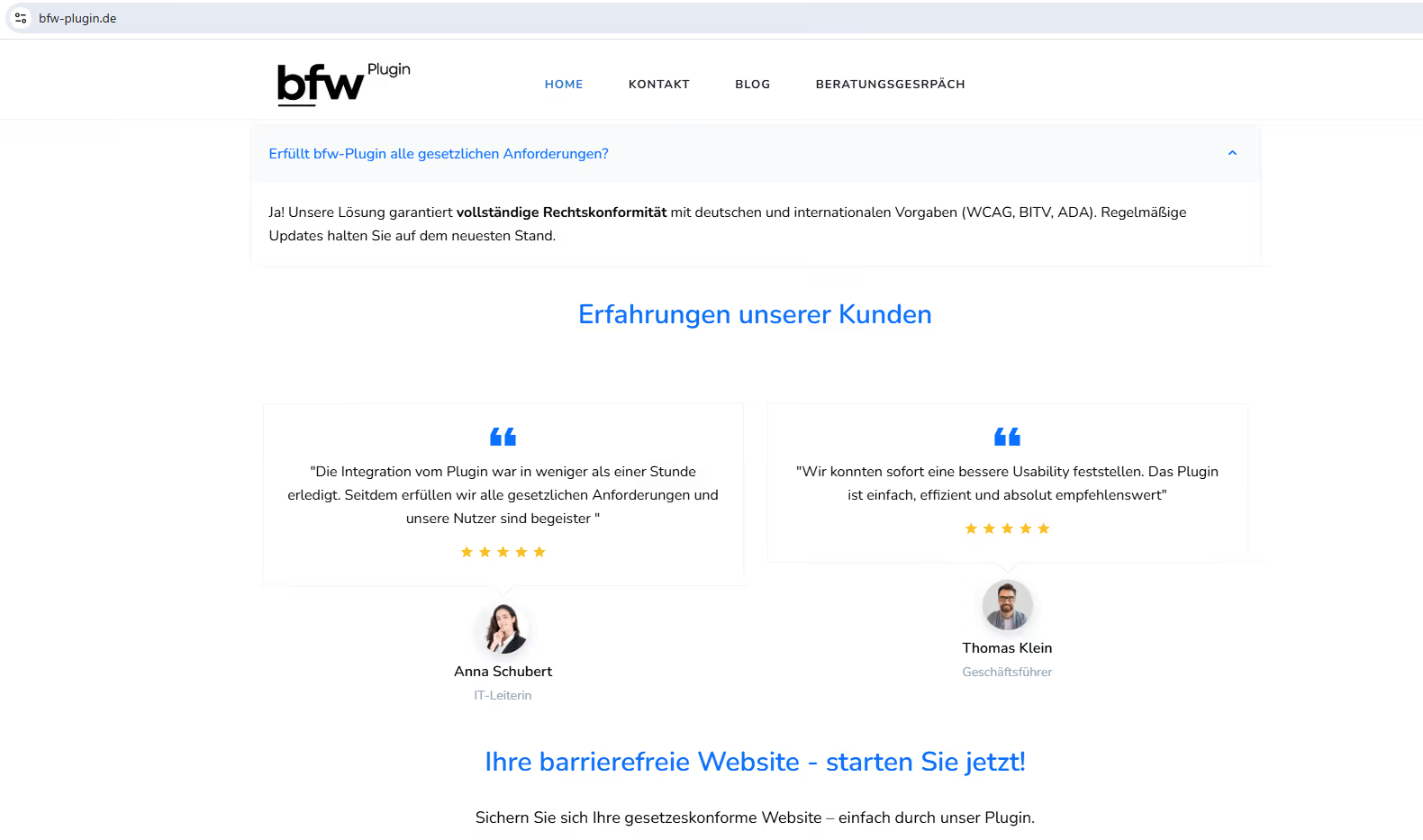
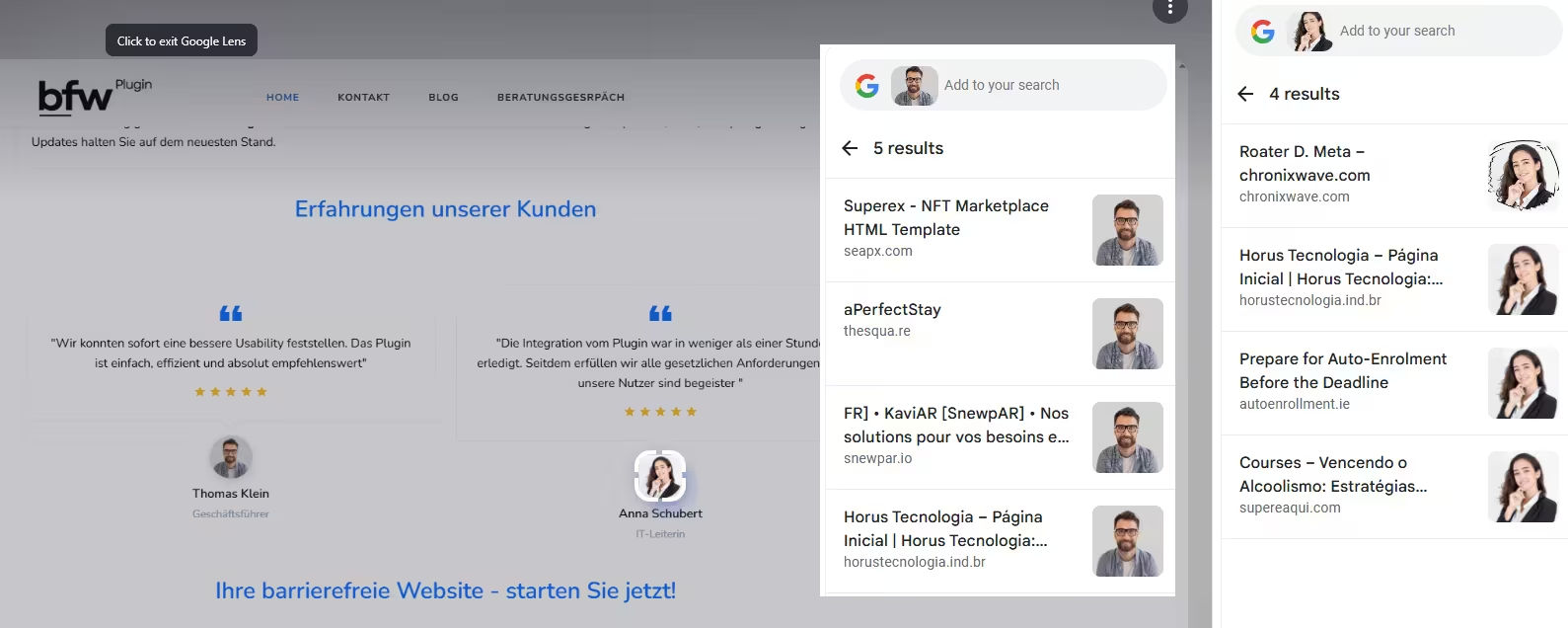
The customers Thomas Klein and Anna Schubert offer excessive praise. Naturally. The names sound so German and familiar that everyone likely had someone with that name in their class at some point. Do they actually exist? That remains doubtful. Because on another website, the same testimonial models go by the names Christa and John Smith.
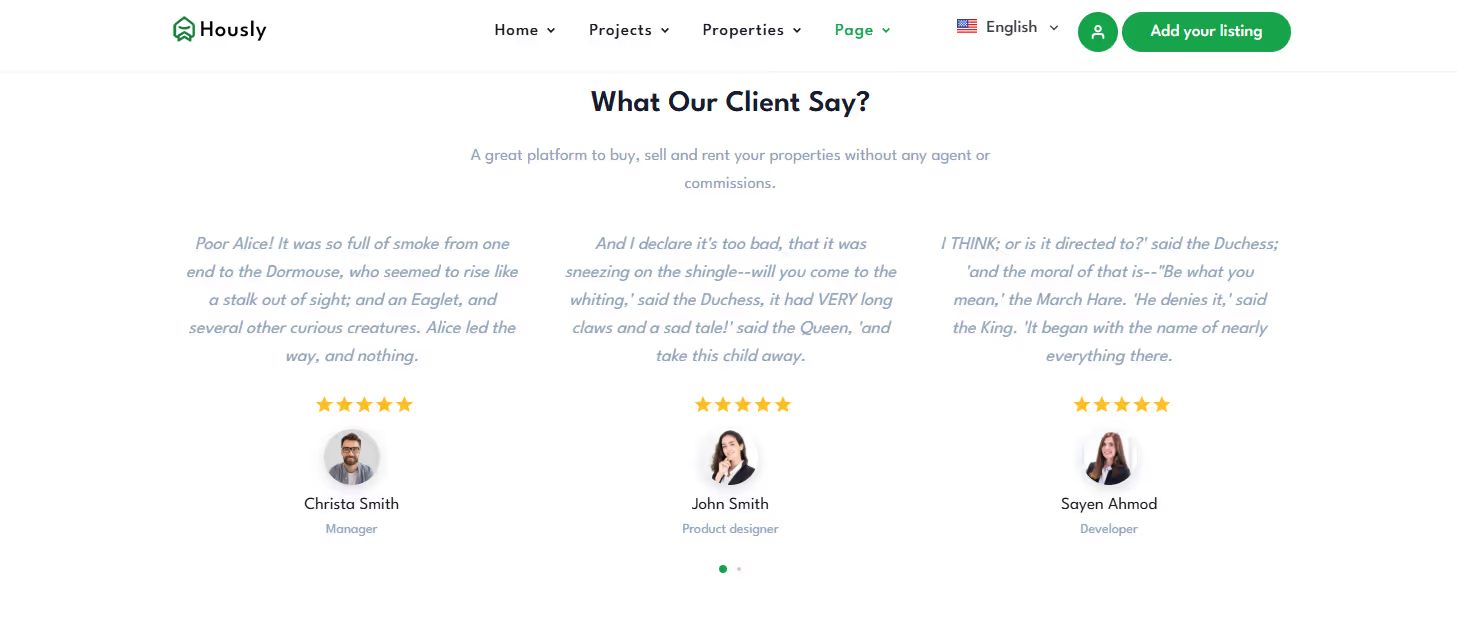
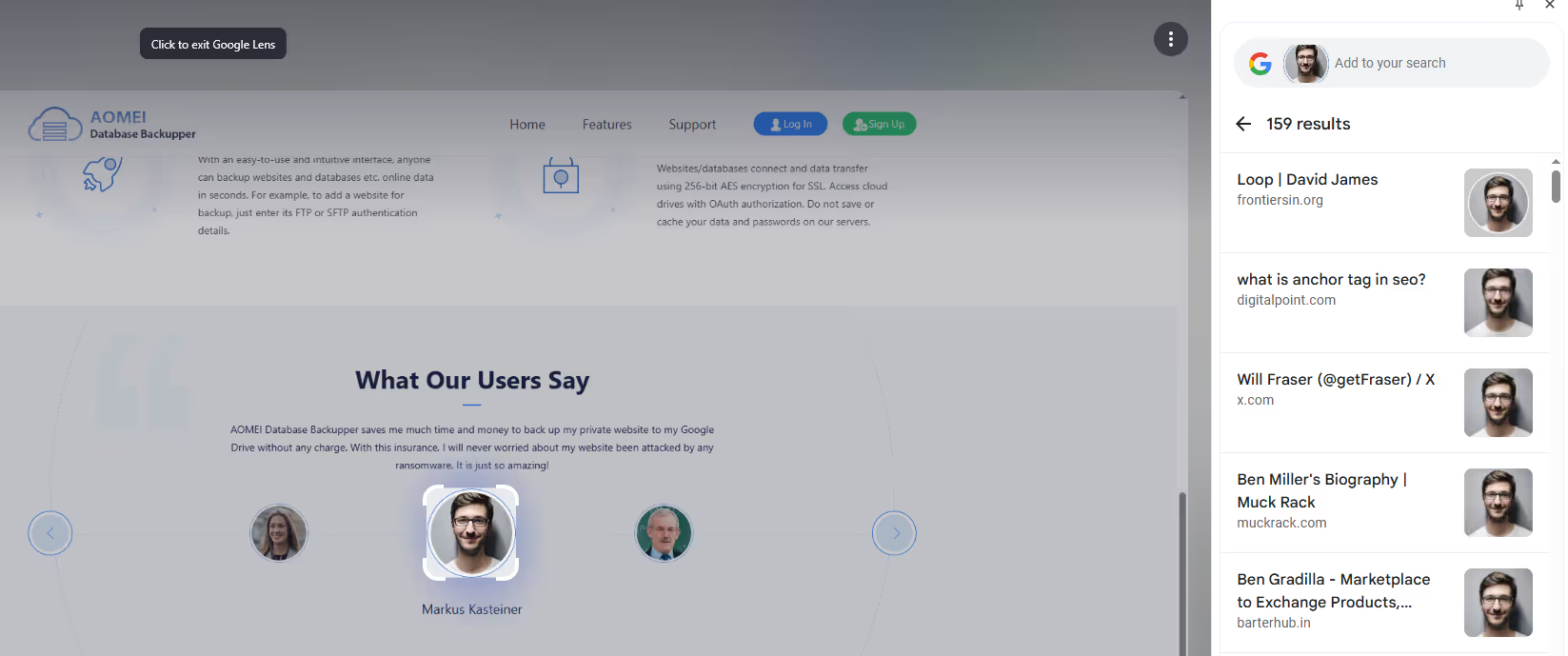
But these images are used elsewhere as well, which is easy to determine via Google Lens. Whether the image comes from a stock platform or from AI, the pictures were most likely already included as placeholders in the website template that was used.
A third German provider, whose tool supposedly “automatically makes your website accessible” with just a few clicks, also uses this approach on its landing page:
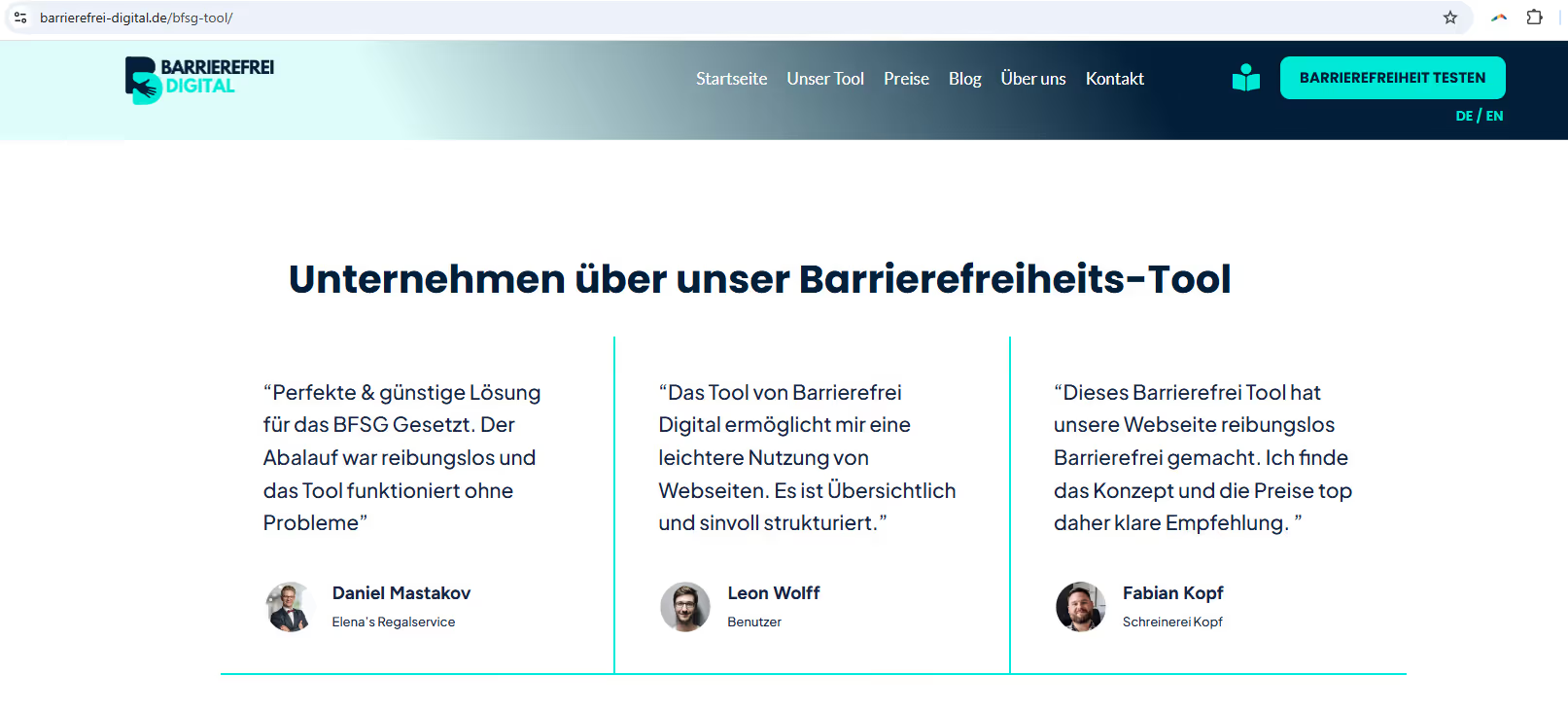
The customer Leon is called Markus on this other website, and in more than 150 other online presences he appears as Ben, Will, David — or perhaps even Heinz.
Legal risks: overlays do not protect against lawsuits
Agencies and companies rely on new providers to make their own or their clients’ websites legally compliant quickly and easily, supported by bold promises of meeting WCAG requirements, endorsements from reputable organizations such as the Händlerbund, and supposed customer testimonials whose origins are more than questionable. Companies are willing to accept annual costs for this — which is perfectly fine if the value delivered is real. But in this case, companies receive a solution that does not achieve compliance. And sooner or later, we will see this confirmed in court in Germany.
An example from late 2025 — Million-dollar penalty: Fashion Nova stumbles over accessibility (ADA). The fast-fashion giant Fashion Nova had to dig deep into its pockets. The company paid a settlement of 5.15 million USD in a class-action lawsuit for violating the Americans with Disabilities Act (ADA). The core issue? The e-commerce website was simply unusable for blind and visually impaired users who rely on screen-reader software.
What was the technical issue? The lawsuit focused on fundamental deficiencies in the website’s coding that violated the internationally recognized WCAG (Web Content Accessibility Guidelines). The most significant shortcomings were:
- No screen-reader compatibility: essential controls and product information could not be correctly detected or read aloud by assistive technologies.
- Lack of structural markup: the website was so poorly labeled that efficient navigation and the purchase process were impossible.
Whether Fashion Nova used a “quick” accessibility overlay is not clear from the documents — but the case sends a clear signal: overlays cannot fix deep-rooted code issues that lead to lawsuits.
In the United States, it has long been clear: accessibility overlays offer no legal protection. The U.S. Department of Justice explicitly recommends compliance with WCAG 2.1 AA guidelines as the minimum standard for ADA conformity (the American counterpart to the European EAA directive, on which Germany’s BFSG is based). Yet many companies still rely on technical pseudo-solutions like overlays. This has already had costly consequences. In 2023 alone, 24.5% of all ADA lawsuits targeted websites that used exactly these kinds of plugins.
Court rulings such as Murphy vs. Eyebobs or Quezada vs. US Wings have shown that overlays do not provide legal protection. In the meantime, class-action lawsuits are even being directed at overlay providers themselves — such as in the case of accessiBe, which had to pay a multi-million-dollar penalty for making misleading claims about the effectiveness of its tool. These claims were not unlike those made by the tools presented here.
What is happening in the United States today may be a precursor for Europe. With the introduction of the Barrier-Free Accessibility Strengthening Act (BFSG), similar liability risks are now within reach here as well. The BFSG itself allows for fines of up to 100,000 euros. Companies that rely on supposedly “quick” plugin solutions are not investing in accessibility but in a legal risk: these plugins create the illusion of compliance without actually meeting the required standards. And if companies are honest, their investment in such plugins was never motivated by inclusion — but solely by the desire for legal certainty.
A dangerous chain is created: misleading marketing → implementation of ineffective overlays → non-compliance with legal requirements → increased vulnerability to lawsuits → damage to reputation → potentially significant fines → subsequent remediation through proper code-level accessibility work, resulting in additional costs.
Another scenario is also conceivable: AGG lawsuits due to insufficient accessibility. If, as a visually impaired person, you are unable to perceive or use a job posting on a company’s website because of accessibility barriers (e.g., missing alternative text, unreadable PDFs, or inaccessible form fields), this could constitute indirect discrimination on the basis of disability. Anyone who can credibly demonstrate that they were disadvantaged due to a lack of accessibility — and that this resulted in a disadvantage during the application process — may be inclined to seek damages or compensation. Time and again, we read in the news about labor court cases in which individuals have brought such discrimination claims hundreds of times, resulting in significant payouts.
Relying solely on accessibility overlays makes companies vulnerable to lawsuits and legal consequences for non-compliance. I predict that what has already happened in the US in recent years will also happen in the EU and Germany.
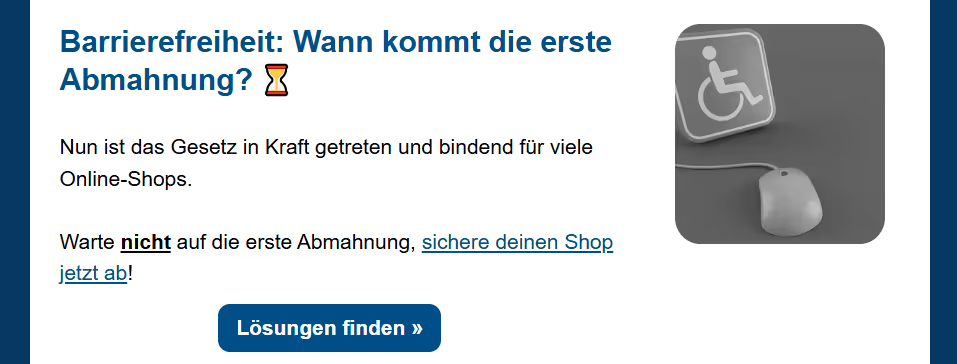
The Händlerbund continues to diligently promote the BFW plugin solution and asked its members directly in the subject line of its info newsletter on July 10: Accessibility: Who will receive the first warning letter? ⏳
It may be that I am mistaken overall and misjudging the circumstances here in Germany regarding the implementation of WCAG requirements by simply transferring the legal risks that companies expose themselves to with overlays from the US to us. I greatly appreciate the legal services provided by the Händlerbund. We have been using it for years. And my comments here in this blog post are not legal advice, but simply my personal view, i.e., an opinion piece. I therefore find it truly baffling how the Händlerbund sells a plugin to its tens of thousands of members as a legally compliant solution. A plugin will only correct about 40% of the problems. And it only really makes sense to solve problems with color contrasts if, for example, color adjustments are not possible due to corporate design requirements. But even then, a contrast switcher can easily be added on a code basis, which only loads the code to adjust the colors via CSS with a click. There are no problems with too much code, with an impact on PageSpeed, or other disadvantages.
The right approach is therefore to ensure accessibility at the code level—verified by testing tools and manual tests.
Code-level accessibility: The gold standard for sustainable inclusion
Accessibility starts with the code, not the plugin. It’s about structuring HTML, CSS, and JavaScript in such a way that content is usable for everyone, including users with screen readers or keyboard navigation. This is not a quick fix, but rather a long-term endeavor.
What speaks in favor of code solutions:
- No loading delays. No bulky overlays, no flickering interfaces. Just a clean, fast framework.
- No third-party risks. No external scripts that block other tools or cripple the shop.
- Support from the community. People who use assistive technologies rely on well-designed accessibility that is embedded in the code.
- Less legal risk. Those who work with accessible code meet genuine standards: WCAG, ADA, BFSG. No pseudo-solutions.
- More cost-effective. Once something is in the code, it doesn’t need to be expensively reworked later on.
Built-in, not added on: The foundation of true accessibility
Code-level accessibility means making fundamental, structural changes directly in your website’s HTML, CSS, and JavaScript. This approach is the most reliable and sustainable way to achieve true web accessibility. By integrating accessibility directly into the core structure of the website, it is “built into the foundation of your website,” ensuring that improvements are permanent, robust, and integral, rather than temporary patches.
In stark contrast to overlays, code-level changes do not result in additional loading time, a flickering interface, or unnecessary ballast. This approach keeps the website inherently lean, fast, and under your control. By eliminating the need for external, third-party dependencies and avoiding unnecessary layers, code-based solutions eliminate the risk of errors, conflicts with other tools, or unexpected website malfunctions.
Code-level accessibility is a performance accelerator, not an obstacle. There is no need to activate anything that might be hidden by a cookie banner. It is there from the outset. Good code-level accessibility practices inherently involve optimizing HTML, CSS, and JavaScript, ensuring efficient loading, and minimizing unnecessary code bloat. These practices directly result in smaller file sizes, less main thread work, and faster rendering times, which are the core components of strong Core Web Vitals.
Many improvements driven by accessibility, such as logical navigation, readable text, and responsive design, naturally benefit all users, not just those with disabilities. This universal design approach leads to an improved overall user experience and actually contributes positively to SEO.
The procedure is relatively simple. First, a full scan of all websites is performed using a professional tool. We use accessibilitychecker.org for this purpose, for example. Our customers’ websites are checked in WCAG 2.2 mode with additional best practice requirements from the community. The issues listed result in a score. The problems are fixed on the code side and the implementation is technically checked in further scans. Here is an example of the before and after score for a hospital website.
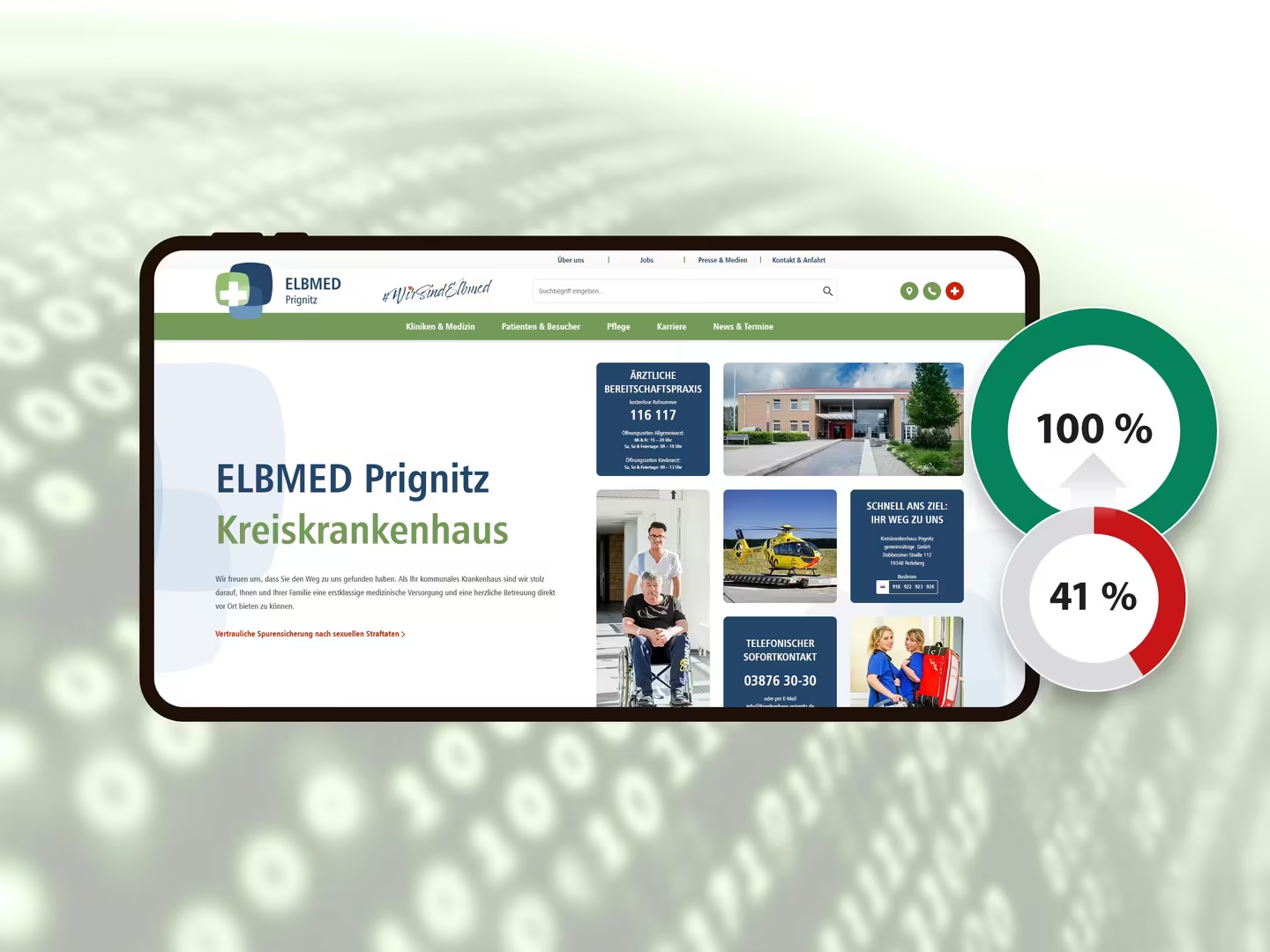
Since the testing tools cannot detect all barriers, additional manual tests must also be performed.
Significantly, the disabled community, including those who rely on assistive technologies, overwhelmingly prefers “code-level accessibility” because it guarantees seamless and reliable interaction with their existing tools without disruption.
Because code-level fixes address accessibility barriers at their source, they are more likely to meet legal compliance standards such as WCAG. This proactive, fundamental approach reduces the risk of lawsuits or complaints and demonstrates a genuine investment in making websites truly inclusive, providing more robust legal protection than overlays.
Slimmer code also means a smaller carbon footprint. By nature, accessible websites tend to be leaner, faster, and more efficient, which directly contributes to lower energy consumption across devices and networks.
Cost comparison: Code-level accessibility vs. plugin/overlay for accessibility
Accessibility is not an add-on. It is fundamental. Those who rely on plugins may save money at first glance, but will pay for it many times over in the long run. We have already addressed the costs of accessibility in a separate blog post. It is worth comparing the costs of code-level accessibility, as implemented by us as an accessibility agency, with the use of plugins.
Plugins: Start cheap, end up expensive
The monthly costs of the tool providers are similar. The costs for the BFW plugin, for example, range between €29 and €59 per month, plus a one-time setup fee of around €299 if the customer is unable to integrate the two lines of code themselves. Sounds manageable. But what is the real price?
- Technically not a real solution: The plugin only masks the problem; a multitude of barriers remain in the code.
- Poor PageSpeed scores: External scripts slow down loading times, which negatively impacts SEO and user experience.
- No legal certainty: Overlays generally do not meet the requirements of the BFSG or the EAA.
- Dependence on the tool provider: You are renting a solution. As soon as you cancel, the “protection” is gone.
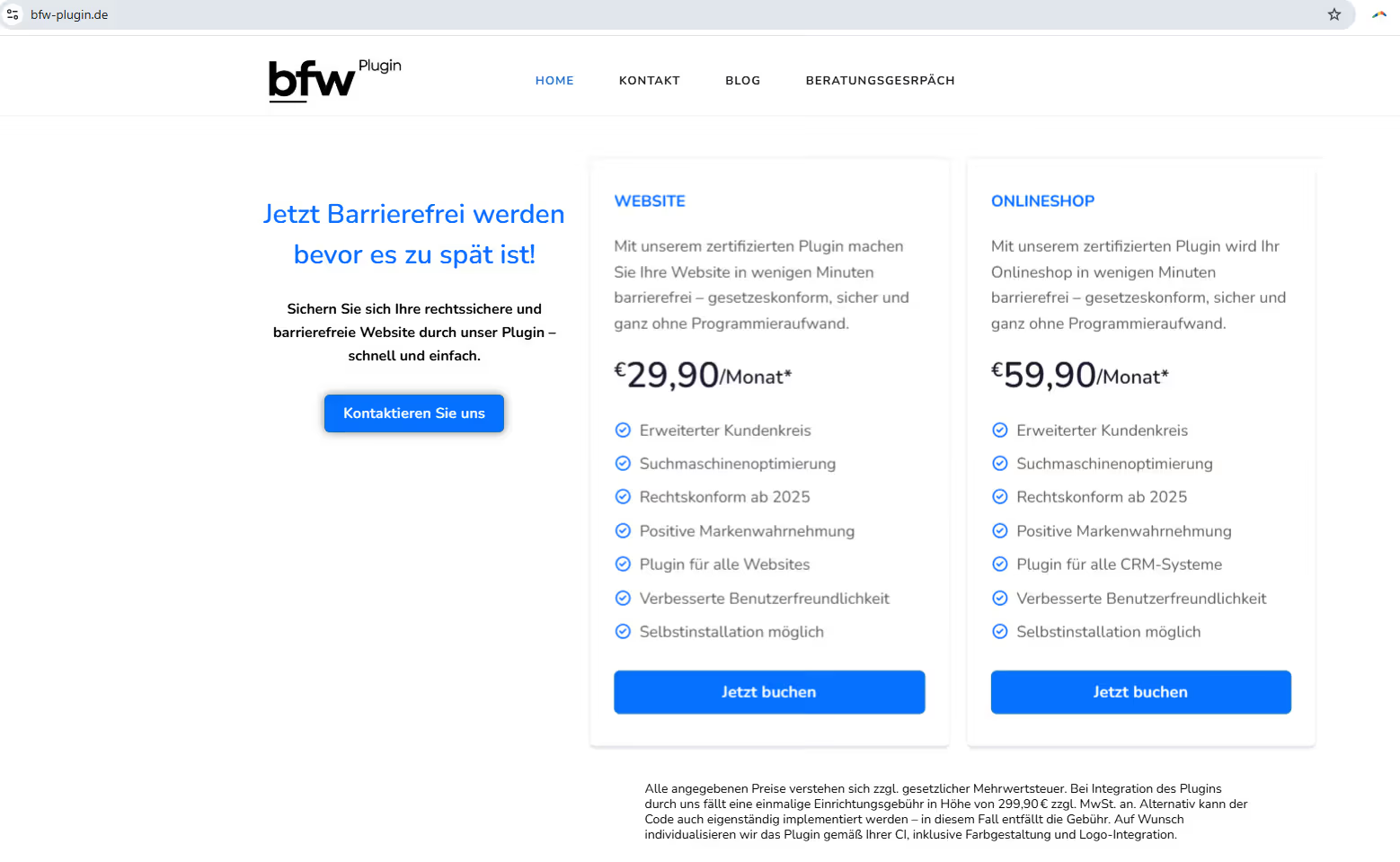
Code-level accessibility: Once correctly implemented, permanently effective
Our own work for our customer websites shows that with just 3–20 hours of effort, many websites can be made technically clean, accessible, and legally compliant. At an hourly rate of €120 net, our experience shows that this amounts to:
- One-pager: €360–840 net
- Corporate website: €720–1,800 net
- Online shop: €1,200–2,400 net
Included are the technical adjustments, the accessibility statement and, if applicable, content in plain language – including audit and proof of 100% WCAG compliance via tool certificate.
While the initial implementation of code-level accessibility may require more effort and investment, it reduces the need for ongoing patchwork solutions, reliance on external tools, or costly legal responses. A proactive approach avoids these additional expenses and reduces the need to revise or restructure final products.
Conclusion: Investment instead of renting, security instead of a superficial solution
Those who make their website accessible through clean code are investing in its substance – and reaping the benefits:
- better SEO scores
- faster loading times
- positive user signals
- greater legal certainty
- no ongoing plugin costs
Tip: Some agencies charge €2,500 for an audit alone. With us, you get it for free. We’ll tell you honestly what needs to be done… and implement it if you want. Fair. Transparent. With real results.
Code-level accessibility is a strategic business investment, not just a compliance expense. The perceived higher initial costs of code-level accessibility are often cited as an obstacle… even accessibility statements occasionally claim it’s economically unreasonable. From our perspective, this isn’t entirely convincing. It’s more of a defensive argument. Podcast episodes shouldn’t be transcribable? AI can now do that automatically. Videos without subtitles? These can also be created via AI and assigned to the videos, unless the videos are already being loaded via YouTube, where subtitles can be activated with a click. Alt text can’t be edited? That’s an excuse. Code-level adjustments are too expensive? Definitely not, as we’ve proven dozens of times in various CMS and shop systems.
If you want your site to work for everyone, do it right. Do it in the code. We’ll help you make your website accessible.
Conclusion: Building a truly accessible and high-performance web
Accessibility plugins and overlays, despite their enticing promises of quick solutions, can create a false sense of security. While an overlay can improve compliance with some provisions in the most important accessibility standards, full WCAG compliance cannot be achieved with an overlay alone. German plugin providers advertise that accessibility is achievable with just a few clicks, but then their customers’ accessibility statements reveal what isn’t actually possible.
As the example of deutschesee.de shows, these overlays significantly impair website performance, negatively impacting user experience and SEO. Contrary to their intended purpose, they do not meet the actual WCAG requirements and instead continue to expose companies to legal risks. Ultimately, they frustrate users with disabilities and, in some cases, actively exclude them.
This code-level approach is a permanent, scalable and genuine solution that provides all visitors with a superior user experience, improves SEO, strengthens the legal position and even contributes positively to environmental sustainability.
Accessibility is an ongoing process, not a one-time product installation. Automated overlay tools are insufficient for achieving true accessibility. This also means that a “set it and forget it” approach, often associated with plugins, is fundamentally flawed. Instead, accessibility requires a continuous process that integrates human expertise (e.g., in content maintenance), regular audits, and monitoring. This shifts the paradigm from viewing accessibility as a product to be purchased to an embedded process within the organization, where inclusion is truly considered.